Social Media Post Ideas to Promote a Sale or Limited-Time Offer

You've set up a great offer-discount, bonus, bundle, early access.
But then the hard part hits:
- "Flash sale" posts that get likes... but no orders
- People saying "omg I forgot to buy" after the deadline
- Last-minute "last chance!!" spam that feels desperate (and doesn't move the needle)
If you want your sale or limited-time offer to actually perform, you need more than one noisy graphic.
You need a sequence of posts designed to do specific jobs:
- Warm people up before you announce the sale
- Clearly explain the offer and who it's for
- Show proof that people are buying and getting value
- Use urgency and scarcity without feeling scammy
- Remind the forgetful (most of us) at the right moments
This guide gives you practical, repeatable social media post ideas for promoting a sale or limited-time offer-across Instagram, TikTok, LinkedIn, X, YouTube, and more.
We'll cover:
- Pre-sale "priming" posts that make the offer feel inevitable
- Hero announcement posts that carry the main load
- Urgency and reminder posts that don't feel spammy
- Social proof & FOMO posts that nudge on-the-fence buyers
- Experiments to improve sale performance over time
- How to use Socialmon to collect and reuse high-ROI sale promos in your niche
Treat this as a swipe file. You don't need all of it for every promotion-pick the ideas that match your product, your audience, and your offer.
How These Sale Post Ideas Actually Help You Sell
All these ideas are designed to improve revenue per impression, not just make your feed look "promotional".
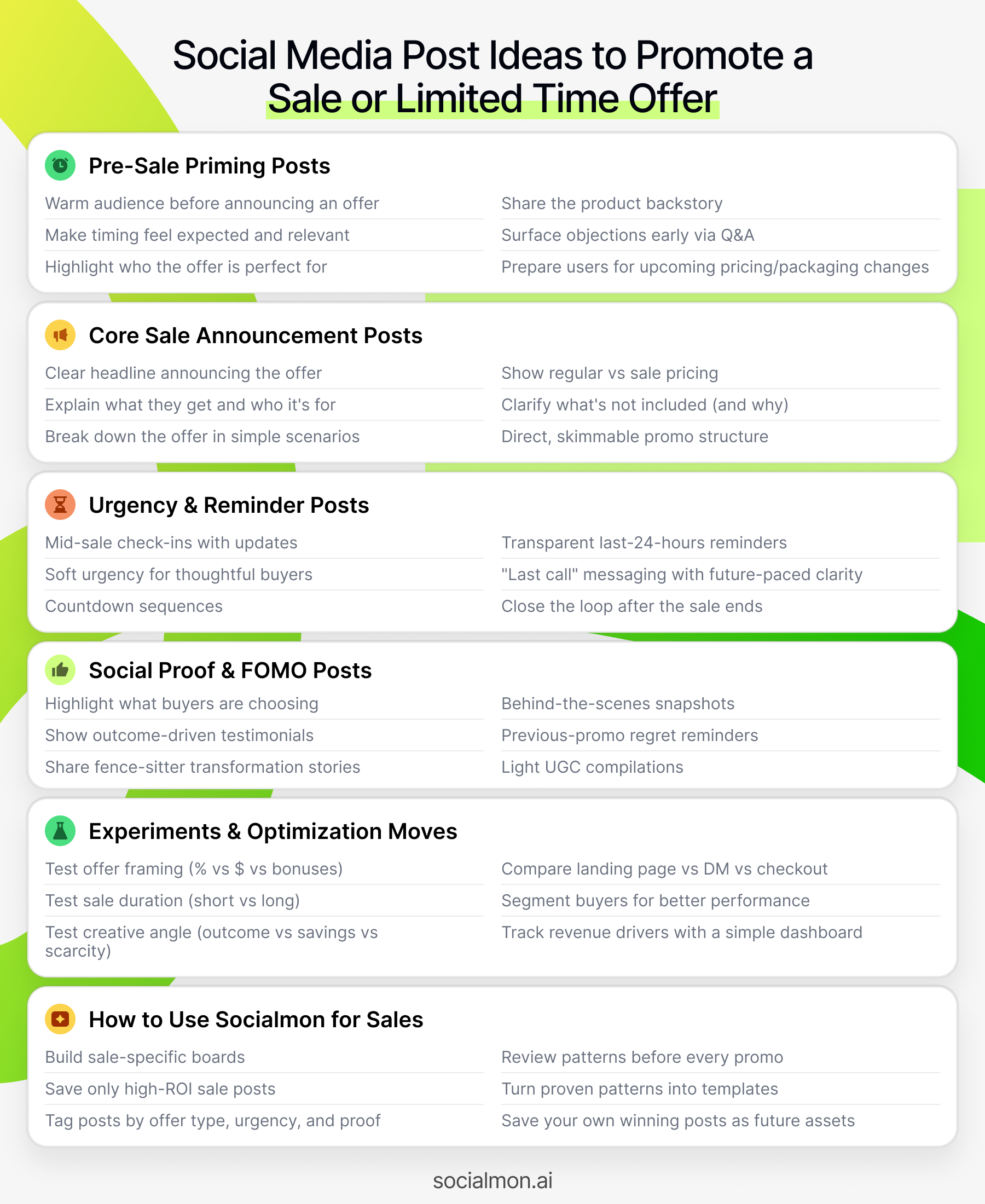
Each post idea is built around at least one of these principles:
- Clarity of offer People instantly understand what the deal is, who it's for, what they save, and until when.
- Context before push You warm people up with the problem, outcome, and timing before asking them to buy.
- Social proof & FOMO You show that others are buying, getting results, or at least seriously considering it.
- Honest urgency Real deadlines, limited spots, or limited stock-explained clearly, not in vague "ending soon 👀" language.
- Segment-aware Some posts are for people who've never bought; others are for existing customers, or people who said "not now" last time.
You can adapt these for:
- Instagram / TikTok / YouTube Shorts - Story sequences, Reels/Shorts, countdown stickers, B-roll + text overlays
- LinkedIn / X - announcement threads, reason-why posts, proof posts, FAQ posts
- Pinterest - pins leading to sale landing pages or discounted product collections
- Email + social together - using your posts to push signups to a sale list, then closing via email
💡 Pro tip with Socialmon Create boards like:
- Sales & Promotions - Announcements
- Sales & Promotions - Urgency & Reminders
- Sales & Promotions - Social Proof
Then, whenever you see posts with comments like:
- "Just grabbed this!"
- "I finally bought, been waiting for this discount"
- "Joining before the price goes up"
...save them. Socialmon becomes your real-world playbook of sale post patterns that actually push people over the line.
A. Pre-Sale Priming Posts (Warm People Up Before You Pitch)
These posts go out 3-14 days before your offer goes live. Their job is to make the sale feel:
- Expected
- Relevant
- Welcome
So that when the discount or bonus finally appears, people think:
"Oh good, this is exactly what I needed."
1. "Problem Season Is Coming" Post
Goal: Make the timing of your sale feel natural and smart (not random).
How to do it:
- Call out a predictable pattern your audience faces:
- "Q4 is chaos for marketers."
- "January is 'fix your body/finances/business' month."
- "New feature flood is coming in September."
- Tie it to the type of product you'll be discounting:
- Tools that save time
- Templates that speed up campaigns
- Courses that help them hit new-year goals
Example caption:
"Every October, founders promise themselves they'll 'fix marketing' before Black Friday. Most don't. Next week I'm doing something to make that easier-especially if you've been eyeing [product]. Stay tuned."
No mention of percentages or coupons yet. Just priming.
With Socialmon: Save posts where brands talk about an upcoming season/problem ("Black Friday prep", "tax season", "Q1 pipeline panic") before mentioning any sale. Tag them sale_prep, seasonal_priming and reuse that pattern.
2. "Who This Offer Will Be Perfect For" Post
Goal: Pre-position the sale as a tailored opportunity for a specific group.
How to do it:
- Describe 2-4 types of people who will get outsized value from the upcoming offer.
- Mention you're preparing something special for them.
- No discount details yet.
Example:
"I'm putting together a short, sharp offer for 3 types of people: - Designers who want more inbound clients - Early-stage SaaS founders under $20k MRR - Solo marketers who are tired of guessing what to post
If that's you, keep an eye on this space over the next week 👀"
Why it works: those people will be primed to pay attention when the sale drops.
3. "Backstory of the Product" Post
Goal: Humanize the thing you're about to discount, so it doesn't feel like "random % off".
How to do it:
- Share why you created the product/service in the first place.
- Include one or two "failed attempts" before you nailed it.
- Hint that something special is coming.
Example:
"I built [product] because I was spending 6-8 hours a week creating content that never sold anything. After trying: - 3 different schedulers - a content calendar template that I never opened - 'post daily' advice that just burned me out I finally built a system that made my posts drive actual revenue. Next week I'm doing something special around [product] for people who've been on the fence. Stay close."
You're warming hearts, not shouting "SALE".
4. "What's Changing After the Sale" Post
Goal: Prepare people for a price increase or packaging change.
How to do it:
- Clearly say what will change after the promo:
- Price going up
- New features, new tiers
- Removing a legacy plan or bonus
- Explain why (costs, focus, sustainability).
Example:
"In two weeks, [product] pricing is changing. - We're adding [features] - We're retiring the old [plan] - New customers will pay [new baseline]
Before that happens, we're opening one final promo for people who've been on the fence-so you can lock in the current pricing. Details soon."
Now the sale feels like a favor, not a random coupon.
5. "Ask Me Anything About [Product]" Pre-Sale Q&A
Goal: Surface objections before the offer drops so you can address them in your sale content.
How to do it:
- Use a question sticker (Stories) or a simple prompt (LinkedIn/X):
- "Ask me anything about [product] / [service] before next week."
- Answer some questions publicly.
- Note recurring fears or confusion to address during the sale.
Example:
"I'll be running a limited-time offer around [product] next week.
Before that, ask me anything about: - What it actually does - Whether it's right for you - How others are using it
I'll answer as many as I can in Stories / comments today."
With Socialmon: Create a Sale - Objections & FAQs board. Save Q&A posts used around launches and promos. You'll get ready-made structures for your own "Ask me anything before the offer drops" posts.
B. Core Sale Announcement Posts (The "Hero" Creatives)
These posts carry the main load. They go live when the sale starts and should contain all the basics clearly:
- What the offer is
- Who it's for
- What they get
- How long it lasts
- Where to go
6. "Offer in One Screenshot" Carousel/Post
Goal: Make your sale understandable in 3 seconds.
How to do it:
- First slide = ultra-clear headline:
- "48-Hour 40% Off All Templates"
- "Founding Member Pricing Ends Friday"
- "Q4 Strategy Sprint - 3 Spots, 25% Off"
- Second slide = "Here's what you get" bullet list.
- Third slide = "Who this is for / not for".
- Last slide = deadline + URL.
Example structure:
- Slide 1: "48-Hour Sale: 40% Off [Product]"
- Slide 2: "What you get" (features, access, support)
- Slide 3: "Perfect for / Not ideal if..."
- Slide 4: "Offer details: price, discount, end date"
- Slide 5: "Go here before [date, time] → [URL]"
This is your anchor post you'll link back to in comments, Stories, and DMs.
7. "Reason-Why Sale" Story or Thread
Goal: Make your sale feel meaningful, not "because other people are doing Black Friday".
How to do it:
Explain in plain language:
- Why you're running this sale / promotion now:
- Anniversary, milestone, price increase, new feature, new year, capacity unlock.
- Why you chose this specific discount or bonus.
- Why now is the best time to buy (logically, not just emotionally).
Example (LinkedIn/X thread style):
"We almost didn't run a sale this year. Here's why we changed our mind 👇
1️⃣ We reached [milestone] and wanted to celebrate with the people who've been here since the early days. 2️⃣ Our pricing is going up in January to make room for [new features/team growth]. 3️⃣ A lot of you told us you were 'waiting for a good moment' to jump in.
So, for the next 5 days, we're doing something we don't plan to repeat soon: - [Offer explanation] - [Exact discount/bonus] - [Deadline/timezone]
Full details + link here → [URL]"
Reason-why posts are powerful for more skeptical / B2B audiences.
8. "Offer Breakdown + Scenarios" Post
Goal: Help people quickly see how the deal applies to their situation.
How to do it:
- Lay out the offer clearly.
- Provide 2-3 realistic "if you're X, here's what you should do" scenarios.
Example (caption or carousel):
"Here's how the [offer] works in practice:
👉 If you're new and haven't bought anything yet Grab the [bundle]-it gives you A, B, C at [discount] and sets you up for the next 6 months.
👉 If you already have [product A] Add [product B] at [discount]. That's usually what people upgrade to next.
👉 If you're a team Use the [team plan]-it includes X seats at [launch pricing] until [date].
Full details + examples on the offer page → [URL]"
This removes decision fatigue, which is a huge sale-killer.
9. "Side-by-Side: Regular vs Sale Pricing" Visual
Goal: Make the value of the discount instantly obvious.
How to do it:
- Use a simple table/graphic:
Plan
Regular
Sale (Until [date])
Product A
$199
$129
Product B
$299
$199
Bundle A + B
$498
$279
- Highlight the bundle or most sensible choice.
- Add a note like: "You keep this price as long as you stay subscribed" if that's true.
Example caption:
"This is exactly how much you save during the [name] sale 👇
If you've been on the fence, this is the least you'll pay for [time period].
Compare plans & grab your spot → [URL] (ends [date, time, timezone])"
10. "What's Not on Sale (And Why)" Post
Goal: Increase trust by being specific about what isn't discounted.
How to do it:
- Explicitly list what's excluded from the sale.
- Explain why:
- New product that's already underpriced
- High-touch service that's capacity constrained
- Partners you don't want to discount
Example:
"What's NOT included in our [name] sale (and why): - [Offer X] → it's brand new and already at 'intro' pricing - [Service Y] → limited capacity; we'd rather keep quality high - [Done-for-you engagement] → we're at max clients
Everything else is fair game, with [X]% off until [date/time]. Full details: [URL]"
Counterintuitively, this increases trust and urgency around what is on sale.
With Socialmon: Save examples where brands clearly explain what's excluded from promos. Tag sale_exclusions, pricing_transparency. These are gold when you don't want to discount everything but still want a strong promo.
C. Urgency & Reminder Posts (Without Being Annoying)
These posts stop the classic "I meant to buy but forgot" problem. They're especially important in the final 48-72 hours of your promotion.
The key: each reminder should either add new information or new context, not just "SALE!!! still on!!".
11. "Mid-Sale Check-In" Post
Goal: Re-state the offer halfway through, with updates or clarifications.
How to do it:
- Share:
- How long is left
- Any popular picks so far
- Clarify any confusion you saw in DMs/comments
Example:
"Quick mid-sale check-in: - 2.5 days left on [offer name] - Most people are grabbing the [bundle] for the extra [bonus] - A common Q: 'Will I get access to future updates?' → Yes, as long as you stay on this plan
If you've been on the fence, details + scenarios are here → [URL]"
Now it's not "another promo post"; it's an update plus a reminder.
12. "Soft Urgency" Post: "Don't Rush, But Don't Sleep On It"
Goal: Nudge people who hate high-pressure sales.
How to do it:
- Acknowledge that not everyone should buy.
- Invite only the right people to move before the deadline.
Example:
"If you're happy with your current setup, you probably don't need this sale.
But if you: - Have been thinking about [product] for a while - Know you'll use it in the next 3-6 months - Want to lock in better pricing before we change it in [month]
Then it probably makes sense to grab it before [date].
All the details are here → [URL]"
This tone works well for thoughtful, skeptical audiences.
13. "Countdown Story Sequence" (with a Small Win)
Goal: Use Stories to create a light countdown, not just a screaming timer.
How to do it:
- Story 1: Small win from someone who bought (mini testimonial or screenshot).
- Story 2: Quick reminder of what's inside / what they get.
- Story 3: Countdown sticker with deadline + link sticker.
- Story 4 (optional): "Reply if you're not sure it's for you" (invite questions).
Example sequence:
- "Anna grabbed [offer] yesterday and messaged: 'This would've saved me 3 weeks last launch 😭'"
- "Inside [offer]: A, B, C. It's designed to [core outcome]."
- "Offer ends in [X hours]. Tap to see if it's a fit → [link sticker] + countdown"
- "Not sure if it's for you? Reply with what you're working on & I'll tell you honestly."
With Socialmon: Save Story sets where creators combine social proof + countdown + link stickers. Tag sale_countdown, story_urgency. These are the best patterns to copy for IG/TikTok Stories and Shorts.
14. "Last 24 Hours" Post With Clear Threshold
Goal: Create real urgency in the final day without being vague.
How to do it:
- Use plain, unambiguous language:
- "24 hours left"
- "Offer ends tomorrow at [time, timezone]"
- Re-state key reasons to buy now:
- Price change
- Bonus ending
- Spots filling
Example caption:
"24 hours left on the [offer name] promo.
After [exact time + timezone]: - Price goes from [sale] back to [regular] - [Bonus] disappears - [Plan] will no longer include [benefit] for new customers
If you've been considering this, now's the moment: [URL]"
Clarity > drama.
15. "Last Call With Future-Paced Regret"
Goal: Nudge people by making them imagine life after the sale ends.
How to do it:
- Frame as a friendly check-in, not shaming.
- Help them picture the "Monday after the sale" scenario.
Example:
"This is your last call for the [offer name] promo-it ends tonight at [time, timezone].
Tomorrow: - The price goes back up to [regular] - The [bonus] goes back in the vault - We move on to serving the people who jumped in
If you know [product] is something you'll end up getting anyway in the next few months, it probably makes sense to do it today instead of paying more later.
All the details are here → [URL]"
Future-pacing works especially well for products people have been "meaning to buy".
16. "Sale Is Over (But Here's What's Next)" Post
Goal: Close the loop and set expectations for people who missed it.
How to do it:
- Thank everyone who joined.
- Share any fun numbers or milestones.
- Tell latecomers what they can do now (join waitlist, get on email list, etc.).
Example:
"The [offer name] sale is now closed.
Thank you to the [X] people who joined-we're excited to help you [outcome].
If you missed it: - [Product] is still available at regular pricing - We'll likely do our next major promo in [month/season] - If you want first dibs next time, get on this list → [URL]
Back to regular programming from tomorrow 💛"
This also gives you an asset to reference when you say "We don't extend deadlines".
D. Social Proof & FOMO Sale Posts That Move Fence-Sitters
Your announcement posts get people interested.
Social proof and FOMO posts are what make people think:
"Okay fine, I really don't want to miss this."
These work best during the middle and final phases of your sale.
17. "What People Are Actually Buying" Post
Goal: Show that real people are taking action right now.
How to do it:
- Share what's selling (without exposing private data):
- "Most popular plan so far is..."
- "Top 3 products people are grabbing..."
- Add 1-2 reasons why those choices make sense.
- Invite people to choose their path.
Example caption:
"Quick snapshot of what people are grabbing in the [offer name] sale: - 48% chose the [Bundle] → best if you want everything in one place - 32% went for [Plan B] → perfect for solo creators - 20% grabbed [Product C] → a good 'test the waters' option
If you're not sure what to pick, this page walks through who each option is best for → [URL] (sale ends [date/time])."
You're not just shouting "people are buying" - you're helping others decide.
18. "Customer Outcomes, Not Just Compliments" Post
Goal: Use testimonials that tie directly to the product's results, not just "this was great".
How to do it:
- Pick 2-4 short quotes that mention:
- Concrete results ("booked 3 clients", "paid for itself in a week")
- Specific feelings ("less overwhelmed", "more confident launching")
- Turn them into a carousel or simple text post.
- End with a friendly nudge back to the sale.
Example:
"Some results from people using [product]:
'Paid for itself in 6 days.' 'We finally stopped guessing what to post.' 'Our Black Friday revenue doubled vs last year.'
If you've been thinking about getting it, the [offer name] promo is live until [date/time]. Details + options → [URL]"
Tip: if you have screenshots (Stripe, Shopify, DMs), blur sensitive info and highlight the win.
19. "I Was on the Fence Too" Relatable Story
Goal: Speak to cautious buyers through the voice of someone who was cautious.
How to do it:
- Pick one customer who:
- Almost didn't buy
- Loved something else in your space
- Thought they "weren't ready yet"
- Tell their story briefly: before → hesitation → decision → after.
Example:
"Jess almost skipped our last sale.
'I'd bought 2 other courses already and barely opened them. I didn't want more guilt.'
She ended up joining on the last day after DM'ing us a bunch of questions.
3 months later: - [Outcome 1] - [Outcome 2] - [Outcome 3]
If you're like Jess - overwhelmed, skeptical, but know this could help if you actually use it - have a look at the [offer name] page before [deadline]. We're happy to answer honest "Is this for me?" DMs too → [URL]."
This reassures thoughtful buyers that hesitation is normal-and surmountable.
20. "Behind-the-Scenes Sales Snapshot" Story
Goal: Make people feel like they're joining something in motion.
How to do it:
- Share a quick BTS:
- "We just crossed X sales"
- "Packing orders / sending access emails"
- "Updating the 'New Members' list"
- Use Stories or short-form video to keep it casual.
Examples:
- Clip of your screen: new orders rolling in → overlay text: "Welcoming new members into [product] all weekend. If you want in at the [offer] pricing, we're live until [date]."
- Short selfie Story: "I've been spending all morning sending welcome emails and onboarding Looms to new customers from the sale. If you'd like to join this week's batch, details are here → [link sticker]."
This creates a sense of movement: "Oh, this is happening."
21. "What Happened to Last Time's Fence-Sitters" Post
Goal: Use gentle FOMO based on previous promos (if this isn't your first sale).
How to do it:
- Share what people told you after the last sale:
- "I missed it."
- "I wish I'd joined earlier."
- "I paid full price later."
- Emphasize that you don't extend deadlines.
Example:
"After our last sale, my inbox looked like this for a week: - 'Any chance I can still get the discount?' - 'I was going to grab it and forgot.' - 'Kicking myself for missing this.'
We didn't extend it then, and we won't extend this one either.
If you already know [product] is something you'll use, this week is the most affordable time to get it. Details & deadline → [URL]"
You're not scolding. You're reminding.
22. UGC / Try-On / In-Use Compilation
Goal: Show your product in the real world during the promo window.
How to do it (especially for physical products / SaaS UX):
- Compile clips or photos of:
- Customers using/wearing your product
- Screenshots of dashboards or workspaces in action
- Short "before/after" shots
- Add light captions: where they're from, what they're using, what they achieved.
Example:
"Here's a glimpse of how people use [product] in real life: - [photo] @user running client calls with our templates open - [photo] dashboard showing their launch numbers - [photo] sticky notes replaced by our Notion system
The [offer name] sale is live until [date/time]. If you'd like to join them, go here → [URL]."
With Socialmon: Create a board Sales - Social Proof & FOMO. Save:
- Testimonial graphics
- UGC compilations
- "We hit X customers" posts
- "I almost didn't buy" stories
Tag them testimonial, bts, ugc, regret, fence_sitters. When you're planning your next promo, you'll have ready-made structures to plug your own proof into.
Experiments & Optimization Moves to Improve Sale Performance
Even a solid sale campaign can underperform if you never test anything.
You don't need complex attribution to improve results-just a willingness to test one variable at a time and track basic numbers.
Here are simple, practical experiments you can run.
23. Offer Framing Test: Percent vs Dollar vs Bonus
Goal: See which framing your audience responds to best.
Variables to test:
- % off "40% Off All Plans"
- Dollar savings "Save $120 on the Yearly Plan"
- Bonus-first "Buy [Product] and Get [Bonus] Free"
How to run it:
- Keep the actual offer the same.
- Create 2-3 variants of your core creative, each highlighting a different framing.
- Rotate them across:
- Different days
- Or different channels
- Track:
- Clicks
- Checkouts
- Revenue per impression (if you can)
What usually happens:
- % off works well for impulse, consumer, lower-priced items.
- Dollar savings or bonuses often convert better for higher-priced or B2B products.
24. Sale Window Test: Short & Intense vs Longer & Gentle
Goal: Find the right duration and intensity for your audience.
Simple pattern to test:
- Promo A: 48-hour "flash sale"
- Promo B: 5-7 day "event sale"
Keep the discount identical and compare:
- Revenue per day
- Total revenue
- Stress on your team
- Complaints / fatigue
General observations:
- Short windows = more urgency, but some people inevitably miss it.
- Longer windows = more relaxed, but require better sequencing to avoid "I'll do it later" syndrome.
You'll quickly find your sweet spot (e.g. 4-5 days is often a good balance).
25. Creative Angle Test: Outcome vs Savings vs Scarcity
Goal: Understand what actually makes people act.
Test three main creative angles:
- Outcome-first - "Turn your content into revenue in 90 days."
- Savings-first - "Save $120 on [product] this week."
- Scarcity-first - "Only 20 seats at this pricing."
How to do it:
- Create three versions of your hero post.
- Keep:
- Visual style
- Offer details
- Link all the same.
- Only change the main hook and emphasis.
- Track which creative angle brings:
- More clicks
- Higher add-to-cart / checkout starts
- Best revenue
Use the winner angle heavily in reminder posts.
26. Landing Page vs DM vs Straight-to-Checkout
Goal: See where your audience prefers to buy.
For some offers, sending people straight to a checkout page works best. For others, they want:
- A landing page with more context
- Or a quick 1:1 interaction (DM) before they commit
Experiments:
- Variant A: Social → landing page → checkout.
- Variant B: Social → DM ("DM SALE for the link + any questions").
- Variant C: Social → direct checkout link (for returning buyers or tiny offers).
Track:
- Conversion rate
- Questions and objections
- Refunds / buyer remorse
You might discover:
- Low-ticket products can handle direct checkout links.
- Higher-ticket or complex things do better with DM or landing-page first.
27. Audience Segment Test: New vs Existing Customers
Goal: Stop treating everyone the same during a promo.
Segment:
- People who've never bought
- People who've bought entry-level products
- People who are already power users
How to test on social:
- Create posts addressed specifically to each segment:
- "If you've never bought from us..."
- "If you already have [Product A]..."
- "If you're a current member of [Program]..."
- Link each to:
- Different landing pages, or
- Same page with different tracking (UTM params)
Compare:
- Which segment responds most to discounts vs bonuses
- Which segment prefers upgrades vs cross-sells
- Where you get the highest revenue per follower
Then bias future sales towards the segments that actually buy.
28. "Sale Content Mix" Test: How Many Posts Is Too Many?
Goal: Find your own balance between visibility and fatigue.
For one sale, intentionally log:
- How many promo posts you made (feed, Stories, Reels, Threads, etc.).
- How many pure-value posts you shipped during the same period.
- How your reach and engagement changed.
Try a rough mix like:
- 40-50% promo-related posts during the sale window
- 50-60% value / entertaining / neutral posts
Compare against a future sale where you:
- Go harder (more promo posts), or
- Go softer (fewer promo posts)
Check:
- Unfollows
- Complaints / DMs
- Total revenue
The goal isn't "never annoy anyone" - it's to find the point where slight annoyance is outweighed by much higher revenue.
29. Basic Sale Performance Dashboard
Goal: Make your sale repeatable by actually looking at the numbers.
You can do this with a basic sheet or Notion table. Track per campaign:
- Inputs
- Sale name
- Start/end dates
- Offer details
- Channels used
- Post-level data
- Platform
- Post URL
- Format (carousel, Reel, Story, thread, doc, etc.)
- Angle (outcome, savings, scarcity, proof)
- Reach
- Clicks
- Outputs
- Orders
- Revenue
- Average order value
- New vs returning customers
After a few campaigns, you'll see:
- Which formats and angles consistently drive the most revenue
- Which channels are worth more effort
- Which offers flop and which offers deserve to be repeated
With Socialmon: Mirror this with a Sale - Winners board:
- Every time a post significantly contributes to revenue (you can tag it manually in your sheet), save it in Socialmon.
- Tag it with:
- outcome_angle, savings_angle, scarcity_angle
- launch, flash_sale, price_increase
- top_revenue_driver
Now your analytics and your visual swipe file reinforce each other.
Using Socialmon as Your "Sale Pattern Library"
Most brands re-invent their sale content every time.
If you use Socialmon intentionally, you never have to start from a blank screen-you start from proven patterns.
Here's how to set it up.
Step 1: Create Sale-Specific Boards
Instead of one generic "inspiration" board, create focused boards like:
- Sales - Announcements & Hero Posts
- Sales - Urgency & Reminders
- Sales - Social Proof & FOMO
- Sales - Price Changes & Founding Member Offers
- Sales - Bundles & Upsells
This lets you search by job, not just "pretty posts".
Step 2: Save Only Posts That Clearly Tie to Sales
As you browse Instagram, LinkedIn, TikTok, X, etc. using the Socialmon capture flow:
Save posts where you see obvious sale behavior:
- Clear discount or limited-time message
- Launch / sale pricing announcement
- "Founding member" or early-bird campaigns
- "Doors closing" or "last call" posts
- "We hit X customers / orders during this promo" posts
Especially keep anything with comments like:
- "Just bought!"
- "I grabbed the bundle."
- "I'm in."
- "Omg I almost forgot, thanks for the reminder."
These are exactly the patterns you want for your next promo.
Step 3: Tag Creatives by Offer, Urgency & Proof Type
Use tags so you can slice your library later. Helpful tag dimensions:
1. Offer type
- percentage_off
- dollar_off
- bonus_included
- founding_member
- price_increase_warning
- bundle_offer
2. Urgency style
- fixed_deadline
- limited_spots
- limited_stock
- evergreen_discount (for comparison)
3. Proof / context
- testimonial
- ugc
- bts_orders
- milestone
- regret_story
4. Format
- carousel
- short_form_video
- stories
- thread
- document_pdf
- text_post
Later, when you're planning a sale, you can filter for things like:
"Show me carousels that use founding member offers + fixed deadlines + testimonial proof."
...instead of scrolling your feed, hoping to remember what worked.
Step 4: Run Pattern Reviews Before Every Big Promo
Before your next launch or sale, do a 30-60 minute review:
- Open Sales - Announcements & Hero Posts.
- Scan 10-20 posts:
- How do they structure the core offer?
- How do they handle "who it's for / not for"?
- How much detail do they give on price and deadline?
- Open Sales - Urgency & Reminders.
- How often do they post reminders?
- What new angle does each reminder add?
- How do they phrase last-call messages?
- Write a quick internal note:
- "Things we want to emulate this time"
- "Angles we haven't tried yet"
- "Patterns to steal for Stories vs feed vs LinkedIn"
Now, instead of guessing, you're designing your sale content based on a curated library of what you already know looks strong.
Step 5: Turn Recurring Patterns Into Internal Templates
Whenever you spot patterns you like, turn them into fill-in-the-blank templates your team can reuse.
For example:
Hero sale carousel template
- Slide 1: "[{X days} sale]: [{X% off / bonus] on [product]."
- Slide 2: "You'll get: [3-5 bullet benefits]."
- Slide 3: "Perfect for / Not ideal if..."
- Slide 4: "What changes after the sale (price, bonus, access)."
- Slide 5: "Offer ends [date/time/timezone] → [URL]."
Last-call Story template
- Story 1: Short proof screenshot.
- Story 2: "Ends in [X hours]" + what changes.
- Story 3: Countdown sticker + link sticker.
- Story 4 (optional): "Reply if you're not sure it's for you."
Keep these templates in an internal doc (Notion, Google Docs) and link to the corresponding Socialmon boards for visual examples.
Step 6: Add Your Own Winning Sale Posts Back Into Socialmon
Your best teacher is your own data.
Whenever a promo of yours:
- Exceeds revenue expectations
- Has a post you can tie to a big spike in sales
- Generates lots of "I bought!" comments and DMs
Do this:
- Clip that post with the Socialmon extension.
- Save it to Sales - Winners (or the relevant sub-board).
- Tag it:
- own_account
- top_revenue_driver
- launch, flash_sale, price_increase, etc.
Over time, you'll build a private, brand-specific "Sales Playbook" inside Socialmon:
- The exact creatives, structures, and angles your audience responds to
- The reminders and social proof that your buyers need
- The mix of urgency vs value that your people tolerate
That's the difference between "we hope this sale works" and "we know how to structure promos that perform."
FAQ: Promoting Sales & Limited-Time Offers on Social Media
1. How often should I promote a sale or discount on social media?
There's no universal "right" frequency, but a good starting point:
- Big promos (e.g. Black Friday, launches, anniversary sales) 2-4 times per year.
- Smaller promos (e.g. flash sales, mid-year discounts, seasonal pushes) 1-2 per quarter, depending on your business.
What matters more than the raw number:
- You're not running constant discounts that train your audience to only buy on sale.
- Each sale is tied to a clear reason (new product, new cohort, seasonal event, price change, milestone).
- You balance sales with a lot of pure value content in between.
If you feel like "all we do is promote," you're probably overdoing it. If people are surprised you're even running a sale, you're probably under-promoting.
With Socialmon: Create two boards: Sales - Big Campaigns and Sales - Micro Offers. Save examples from brands you respect, then note how often they run big vs small promos and how they justify each one (launch, birthday, milestone, clearance, etc.).
2. Should I use percentage discounts, dollar discounts, or bonuses?
All three can work - but they feel different:
- Percentage off (e.g. 30% off)
- Easy to understand.
- Works well for consumer products, mid-range pricing, bundles.
- Dollar off (e.g. Save $50)
- Feels more tangible, especially on higher-priced offers.
- Better when the number is meaningful (saving $5 on $300 is weak; saving $120 is strong).
- Bonus-first ("Buy X, get Y free")
- Great when you don't want to cheapen the core product.
- Perfect for info products, SaaS add-ons, and service upgrades.
A simple approach:
- Pick your actual offer (what you're comfortable giving).
- Test two framings (e.g. "30% off" vs "Save $90").
- Watch which version gets more clicks and conversions.
With Socialmon: Tag sale posts you save by discount style: percent_off, dollar_off, bonus_offer. Over time, you'll see which framing patterns tend to appear on posts with lots of "Just bought!" comments.
3. How many times should I post about the same sale?
Most brands under-communicate their promos.
As a minimum for a 5-7 day sale, aim for:
- Feed / main content:
- 1 hero announcement
- 2-3 different angles during the sale (social proof, FAQ, behind-the-scenes)
- 1 "last 24 hours" or "last call" post
- Stories / short-form / ephemeral formats:
- 1-2 mentions near the start
- 1-2 mid-way check-ins
- 2-3 reminders in the final 24 hours (countdown, questions, "any last doubts?")
If you feel slightly repetitive, you're probably at the right intensity. Most followers do not see every post you publish.
Pro tip: In Socialmon, create Sales - Reminders & Last Call. Save examples of how brands remind people without sounding robotic (e.g. "last chance", "doors close tonight", "we start tomorrow"). Use these as templates.
4. Will promoting sales hurt my reach or annoy my audience?
Anything overdone can hurt reach and annoy people. But well-designed sale content can still:
- Educate (case studies, demos, behind-the-scenes)
- Entertain (fun hooks, stories, memes)
- Build trust (social proof, transparent pricing, clear comparisons)
To reduce "annoying":
- Avoid only posting "sale ends soon" graphics.
- Mix in value: mini-tips from your product, FAQ answers, snippets of the thing they'll get.
- Don't run sales constantly. Let people enjoy regular content in between.
If you get zero pushback, you might actually be under-selling. A tiny bit of friction is normal when you start promoting seriously.
5. How do I know if my sale posts are actually driving revenue?
You don't have to build a full data warehouse. Start simple:
- Use unique URLs or UTM tags for each sale campaign
- e.g. ?utm_campaign=bf2025_announcement, bf2025_lastcall
- Keep a basic "Sale Campaign" sheet
- Campaign name, dates
- Main posts (links to each)
- Rough metrics: reach, clicks, orders, revenue
- Map spikes in revenue back to posts
- If you see a spike on a day where you shipped a specific post (e.g. social proof carousel + countdown Stories), that combo probably mattered.
- Mark "winner" posts
- Highlight posts that correlate with strong spikes.
- Next sale, reuse their angle/structure.
With Socialmon: Save those winner posts to a dedicated board like Sales - Winners. Tag them with campaign name and a note (high_revenue, best_last_call, etc.). Now you have a visual + data-backed record of what actually worked.
6. What if my audience is small - is it even worth running sales?
Yes-as long as your offer and pricing make sense for your stage.
With a small but relevant audience:
- A handful of buyers can make a sale worth it (e.g. 5 customers at $200 = $1,000, which is meaningful for an early-stage solo founder).
- Sales can be a conversion catalyst for warm lurkers who've been watching quietly.
- You get data and learn what resonates, which is just as valuable as the short-term cash.
Focus your promo on:
- Clarity over hype ("Here's who this is for, here's what changes after the sale").
- Personal touch (DM-based offers, audits, live Q&A).
- Clean offer (one main product/plan, not an overly complex menu).
With Socialmon: Save sale posts from smaller accounts in your niche (look at follower counts). They're often closer to your own situation than huge brands. Study how they handle urgency, proof, and how "raw" vs polished their content is.
7. Should I discount my flagship product or only side offers?
It depends on your brand positioning and margins.
Common approaches:
- Discount side products, not your signature offer
- Keeps your main offer premium.
- Great for warming people up with a lower-ticket entry point.
- Discount your flagship once or twice a year (max)
- Big dopamine hit + strong revenue spikes.
- Works well for Black Friday, anniversaries, or major updates.
- Train your audience that these truly are rare events.
- Founding member / price-raise sale
- Instead of a "discount," frame it as "lock in this price before it goes up".
- Useful when your product is new or about to get a significant upgrade.
Whatever you choose, be consistent. If you constantly "break your own rules," trust erodes quickly.
8. How can Socialmon specifically help me run better sales?
Think of Socialmon as your sale content control room:
- You use the Chrome capture flow to save posts from Instagram, TikTok, LinkedIn, X, etc. whenever you see:
- Great launch / sale announcements
- Strong last-call posts
- Creative bundles and bonuses
- Transparent price changes
- "I just bought!" comment storms
- You organize them into sale-specific boards:
- Sales - Announcements
- Sales - Social Proof
- Sales - Last Call
- Price Increase & Founding Member
- You tag creatives by:
- Offer type (percentage_off, bonus, bundle, founding_member)
- Format (carousel, reel, story, thread, doc)
- Angle (outcome, savings, scarcity, proof)
- Then, when it's time for your sale:
- You open the relevant board.
- Pull up 3-5 examples per stage (announcement, mid-sale, final day).
- Use their structure as templates for your own content instead of guessing from scratch.
Over time, you also add your best-performing sale posts back into those boards, tagged as own_account and top_revenue_driver. Socialmon becomes your brand's private "Sales & Launches Playbook".
Turning Your Next Sale Into a Repeatable System
Promoting a sale or limited-time offer isn't just about one big announcement graphic.
It's about designing a simple, repeatable system where:
- Your sale has a clear offer (what's included, for who, at what price, and what changes after).
- Your posts cover different angles over the campaign:
- Outcome & benefits
- Details & FAQs
- Social proof & behind-the-scenes
- Urgency & "last call"
- Your landing page matches your messaging and doesn't confuse people.
- You track just enough data to learn which posts and angles actually drive revenue.
Here's a quick checklist you can use for your next promo:
Before the sale
- Define the goal of this sale (cash now, new customers, reactivation, moving inventory, etc.)
- Decide your core offer and how you'll frame it (percent off, dollar off, bonus, founding member, price increase).
- Map the campaign timeline (start date, end date, key milestones).
- Set up a clear landing page or checkout with:
- Offer summary
- Who it's for / not for
- What changes after the sale
- FAQ and social proof
Content plan
- 1 hero announcement post (per major channel).
- 2-4 mid-sale posts:
- social proof
- objections / FAQ
- behind-the-scenes
- "what others are buying"
- 1-2 last-call posts (feed + Stories / Reels / short-form).
- A few value posts sprinkled in so your feed doesn't feel like an ad wall.
Measurement
- Add UTM tags or unique URLs for the campaign.
- Track: reach, clicks, orders, revenue by day.
- After the promo, identify 3-5 posts that correlated with the biggest spikes.
In Socialmon
- Create or update boards like Sales - Announcements, Sales - Social Proof, Sales - Last Call, Sales - Winners.
- Save standout sale posts from your niche into those boards as you see them.
- After your sale, clip your own top-performing posts and tag them (own_account, top_revenue_driver).
Do this for 2-3 promos and you'll notice a big shift:
- You're no longer scrambling to "think of a sale post idea" the night before.
- You have go-to templates and angles that you know work for your audience.
- Each new sale becomes easier, more consistent, and more profitable.
Use this article as your idea engine for sale and limited-time offer post formats. Use Socialmon as your pattern library-a growing collection of real-world examples and your own proven winners.
The next time you have a promo, you won't be asking "What should we post?" You'll be asking: "Which of our proven patterns do we want to run this time?"



Get 50 viral posts for your niche (free)