Social Media Post Ideas to Educate Your Audience
You're posting, but you keep hearing things like:
- "I still don't really get what you do."
- "This is interesting... but how would I use it?"
- "I wish someone would just explain this simply."
Most brands massively under-educate their audience.
They post:
- random tips with no structure
- vague "value" statements with no context
- product updates that assume people already understand the basics
If you want people to actually buy, they first need to:
- Understand the problem in concrete terms
- See the landscape (choices, trade-offs, mistakes)
- Trust that you know what you're talking about
- Believe they can succeed with your help
That's what educational content is for.
This guide walks through practical, repeatable social media post ideas for educating your audience across Instagram, TikTok, LinkedIn, X, YouTube, and more.
We'll cover:
- Post formats that teach clearly (without turning into a textbook)
- How to sequence "beginner → intermediate → advanced" educational content
- Ways to reuse educational posts to drive leads, signups, and sales
- How to use Socialmon to build a library of educational formats in your niche
Use this as a swipe file. Don't try everything at once; pick a few ideas that match your audience's level and your product, implement them properly, then iterate.
How These Post Ideas Help You Educate (Without Losing Attention)
Good educational posts do more than just "share tips." Each idea in this guide is designed to do at least one of these jobs:
- Clarify concepts Turn confusing jargon into simple, visual explanations.
- Show processes Lay out "first do this, then that" so people see the path.
- Correct misconceptions Gently (or boldly) debunk common myths that block progress.
- Show decisions & trade-offs Help your audience choose between options with confidence.
- Bridge knowledge to your product Educate in a way that naturally makes your product the obvious next step.
You can adapt these ideas for:
- Instagram / TikTok / YouTube Shorts Short tutorials, visual frameworks, "watch me do this" content.
- LinkedIn / X Threads, documents, and carousels that teach a specific concept in depth.
- Pinterest / YouTube long-form Deeper guides, how-tos, and frameworks that you can continuously point people to.
💡 Pro tip with Socialmon Create boards like:
- Education - Fundamentals
- Education - How-Tos & Tutorials
- Education - Deep Dives & Frameworks
Every time you see a post that makes you think "wow, that explained it so clearly," save it. Over time you'll build a real example library of how top brands in your niche teach complex things simply.
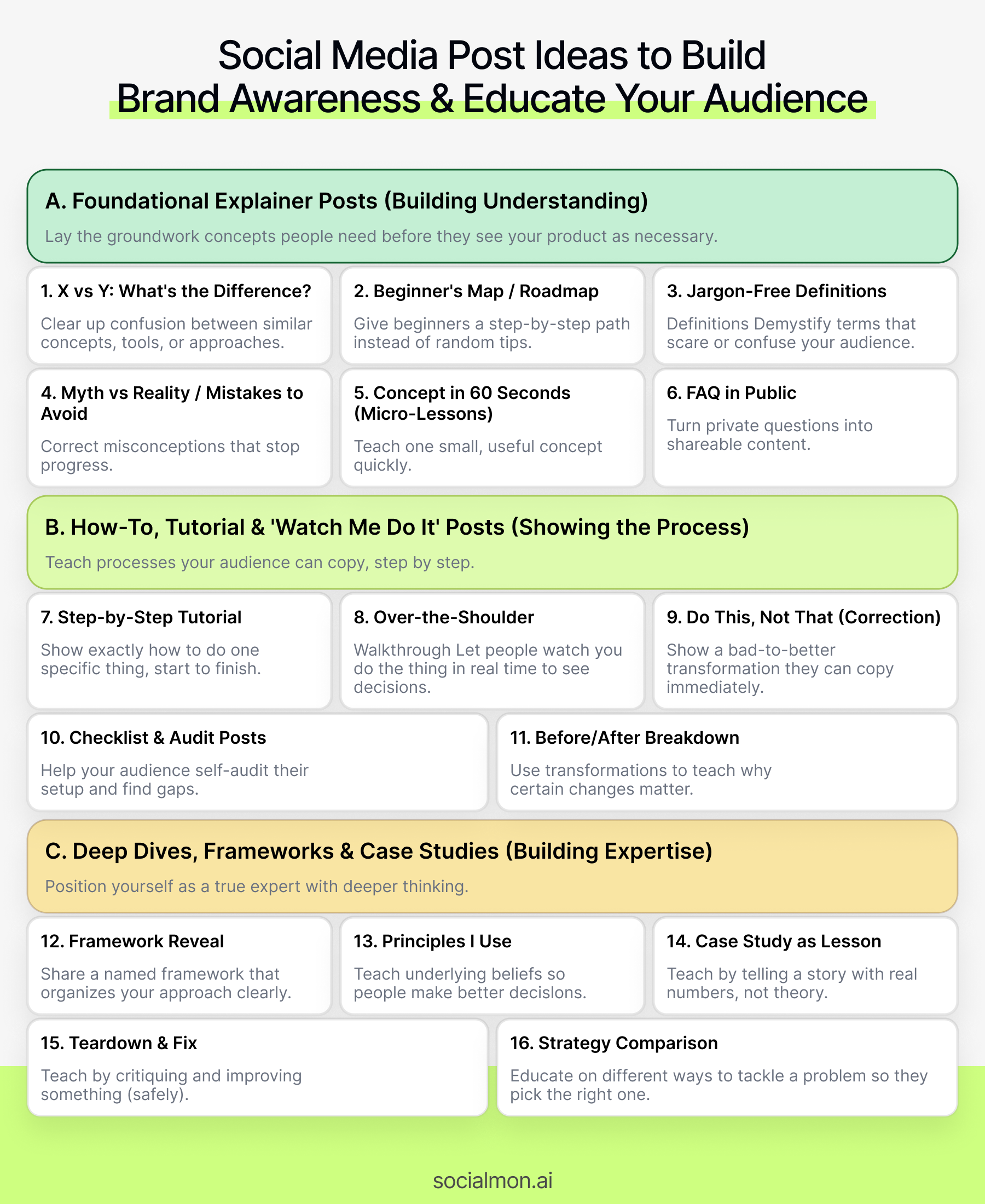
A. Foundational Explainer Posts That Build Understanding
These ideas are about laying the groundwork-the concepts people need to understand before they'll ever see your product or service as necessary.
1. "X vs Y: What's the Difference?" Posts
Goal: Clear up confusion between similar concepts, tools, or approaches your audience mixes up.
How to do it:
- Pick pairs your audience constantly confuses:
- Branding vs marketing
- Reach vs impressions
- CTR vs conversion rate
- Coaching vs done-for-you services
- Feature A vs Feature B in your own product
- Use a simple structure:
- What they have in common (1-2 lines)
- How they differ (3-5 concrete points)
- When to use one vs the other
Example (LinkedIn carousel or IG carousel):
Slide 1: "Reach vs Impressions: What's the Real Difference?"
Slide 2: "What they have in common" "Both are about how many times your content shows up. But they don't measure the same thing."
Slide 3: "Impressions" - Total number of times your content was displayed - One person can generate multiple impressions - Useful for: visibility and top-of-funnel
Slide 4: "Reach" - Number of unique accounts who saw your content - Each person is counted once - Useful for: how many individuals you actually reached
Slide 5: "Which should you care about?" - Want awareness? Look at reach. - Want to know if content is sticky? Watch impressions grow for the same reach.
Slide 6: "Save this for later. We break down metrics like this every week so you can make smarter content decisions."
Why it educates well:
- It directly addresses confusion your audience already has
- You become "the brand that finally explained this in plain language"
With Socialmon: Search for carousels and threads with titles like "X vs Y," "This, not that," or "Don't confuse X with Y." Save the ones that feel clear. Use them as structural templates for your own "X vs Y" posts.
2. "Beginner's Map" or "Roadmap" Posts
Goal: Give beginners a step-by-step path instead of random tips.
How to do it:
- Choose a journey your audience cares about:
- Launching their first product
- Getting their first 100 customers
- Building a brand from scratch
- Setting up a content system
- Break it into 3-7 stages max:
- Stage 1: Foundation
- Stage 2: Setup
- Stage 3: First experiments
- Stage 4: Optimization
- Stage 5: Scaling
- For each stage, share:
- The goal of that stage
- 2-3 tasks or milestones
- 1 key mistake to avoid
Example (thread or carousel):
"If you're just starting with content, here's a simple roadmap to go from 'no idea' → 'consistent and effective':
Stage 1: Clarity (Week 1-2) - Decide who you're really talking to - List 10 problems they want solved - Pick 3 content pillars
Stage 2: Setup (Week 2-3) - Create basic profiles on 1-2 platforms - Build a simple link-in-bio with 1 main CTA - Create a content ideas doc
Stage 3: Consistency (Week 3-6) - Post 3x/week minimum - Focus on one main format - Track reach, saves, and replies
...(etc)
Save this roadmap, and follow if you want more "start here" guides like this."
Why it educates well:
- Removes overwhelm ("I don't know where to start")
- Helps people self-assess: "I'm in Stage 2 → here's what to focus on"
💡 Socialmon angle: Build a board called Roadmaps & Step-by-Step Guides. Save posts like "From 0 → 10k followers," "Roadmap to your first $1k MRR," etc. When you create your own roadmap, open the board, pick 2-3 structures you like, and mash them into your own version.
3. "Jargon-Free Definitions" Posts
Goal: Demystify terms that scare or confuse your audience.
How to do it:
- List 10-20 pieces of jargon in your niche:
- CAC, LTV, MRR, A/B test
- Attribution, retargeting, lead scoring
- Content pillars, narrative arcs, ICP, etc.
- For each term, create a post that:
- Gives a plain language definition
- Shows a simple example
- Explains why it matters
Example (short-form video script):
"Let's talk about CAC in plain English.
CAC = Customer Acquisition Cost. In other words: how much you spend to get one new customer.
Example: - You spend $1,000 on ads in a month - You get 10 new customers - Your CAC is $100
Why it matters? - If your CAC is higher than what you earn from a customer, you've got a problem. - If your CAC is much lower, you can safely spend more to grow.
Save this and send it to the teammate who keeps mixing CAC up with 'cost per click'."
Why it educates well:
- People are embarrassed to ask what jargon means
- You become the approachable expert who explains without condescension
4. "Myth vs Reality" or "Mistakes to Avoid" Posts
Goal: Correct misconceptions that stop people from making progress (and from using your product correctly).
How to do it:
- Collect 5-10 myths you hear repeatedly:
- "Posting every day is all that matters."
- "Branding is just a logo."
- "You need a huge budget to get results."
- "Only big accounts can do X."
- Structure:
- State the myth
- Explain why it's wrong / incomplete
- Share a more accurate perspective
- Offer 1-2 practical alternatives
Example (carousel):
Slide 1: "3 myths about 'educating your audience' that quietly hurt your brand."
Slide 2: Myth #1 - 'If I share too much, people won't buy' Reality: People don't pay for information, they pay for implementation and support. What to do instead: share your best ideas, charge for structure & help.
Slide 3: Myth #2 - 'Educational content has to be long' Reality: Some of the best lessons fit in 30 seconds. What to do instead: share one clear idea per post.
Slide 4: Myth #3 - 'My audience is too advanced for basics' Reality: Advanced people still appreciate clear thinking on fundamentals. What to do instead: revisit basics with deeper nuance or better examples.
Slide 5: "If you want to build a brand people actually learn from, follow us. We breakdown real examples every week."
Why it educates well:
- People feel "seen" when their mistaken beliefs are named
- You shift their mindset closer to how you see the world, which makes your offers make more sense
5. "Concept in 60 Seconds" (Short-Form Micro-Lessons)
Goal: Build a reputation as "the account that teaches me something useful in under a minute."
How to do it:
- Pick one small concept per video:
- One framework
- One formula
- One mental model
- One specific use-case of your product
- Script it like:
- Hook: "In 60 seconds, here's how to..."
- 3 simple points or steps
- One example
- Light CTA (save / follow / go deeper)
Example (Reel / TikTok):
"In 60 seconds, here's how to turn one blog post into 5 educational social posts:
1️⃣ Turn the intro into a 'Here's what most people get wrong' post. 2️⃣ Turn each section into a separate carousel. 3️⃣ Turn the conclusion into a 'Do this, not that' checklist. 4️⃣ Record a 30s 'summary' video. 5️⃣ Turn your examples into their own 'before/after' posts.
Save this next time you publish a new article."
Why it educates well:
- Easy to binge
- Gives your audience lots of "I learned something fast" moments that build trust over time
With Socialmon: Create a board called Short Micro-Lessons. Save short-form videos that clearly teach one idea in under a minute. When scripting your own, open that board and copy pacing, structure, and visual cues from the best ones.
6. "FAQ in Public" Posts
Goal: Take questions you usually answer in private and turn them into shareable educational content.
How to do it:
- Go through:
- Sales calls
- DMs
- Support tickets
- Emails and list the most common questions.
- For each question, create:
- A single post ("Q: ... A: ..."), or
- A carousel / document with "10 questions we get all the time"
Example (LinkedIn post):
"Q: 'How much do I need to know about marketing before your tool makes sense for me?'
A: Not as much as you'd think.
Here's what helps: - You know who you're trying to reach - You know roughly what you're selling - You care enough to look at basic metrics once a week
You don't need: - A marketing degree - A huge budget - A content team
We built [product] so that founders who are willing to learn as they go can still make smart decisions."
Why it educates well:
- Answers real questions, not hypothetical ones
- Reduces anxiety about whether your solution is "for them"
💡 Socialmon angle: Save FAQ-style posts into a FAQ & Objections board. When you notice a question coming up repeatedly in comments/DMs, turn it into content-and save your post back into Socialmon as own_account + faq_post for future reference.
B. How-To, Tutorial & "Watch Me Do It" Posts
Foundational explainers are great, but people really learn when they see how to do something, step by step. These post ideas focus on teaching processes your audience can copy.
7. "Step-by-Step Tutorial" Posts
Goal: Show people exactly how to do one specific thing, from start to finish.
How to do it:
- Pick one concrete outcome:
- Set up your first email welcome sequence
- Write a basic landing page in 30 minutes
- Create a content calendar for one month
- Configure a tracking dashboard
- Break it into 4-8 clear steps.
- For each step, show:
- What to do
- What it should look like
- 1 tiny "pro tip" or mistake to avoid
Example (carousel):
Slide 1 - "How to turn one blog post into 5 social posts (step-by-step)" Slide 2 - Step 1: Highlight key sections - Identify intro, 3 main arguments, conclusion - Highlight any strong lines or examples
Slide 3 - Step 2: Turn intro into a hook post - Copy the "problem" section - Rewrite it as a short "Here's what everyone gets wrong" post
Slide 4 - Step 3: Turn each argument into its own carousel - One key idea per carousel - 3-5 slides per idea
... Final slide - "Save this, then try it with your latest article this week."
Why it educates well:
- Gives people a process they can literally follow with their own work
- Makes you feel like a practical teacher, not a vague thought leader
With Socialmon: Create a board called How-To & Tutorials. Save carousels and threads that show clear, numbered steps (even from other industries). When you build your own tutorial, open that board and mirror the best structures and pacing.
8. "Over-the-Shoulder" Walkthrough Videos
Goal: Let people watch you do the thing, in real time (or sped up), so they see the actual decisions you make.
How to do it:
- Choose a process you can screen-record or film:
- Auditing a landing page
- Setting up a campaign
- Editing a Reel
- Reviewing analytics and deciding what to do next
- Record your screen or workspace.
- Add voiceover or captions explaining:
- What you're doing
- Why you're doing it
- What you're looking for
Example (Reel / TikTok):
"Watch me turn a messy 'About' section into a clear value proposition in under 3 minutes.
- Step 1: Strip out everything that's about us - Step 2: Rewrite the first line so it's about the customer's outcome - Step 3: Add 3 bullets: who it's for, what it does, why it's different
You can pause and copy the structure for your own site."
Why it educates well:
- People see your thinking process, not just the finished product
- Builds huge trust: "Oh, they actually know what they're doing"
💡 Socialmon angle: Save "watch me do X" videos into a board like Live Walkthroughs & Audits. These are gold for studying how experts teach while working. Then create your own version for the key jobs your product helps with.
9. "Do This, Not That" Practical Correction Posts
Goal: Show a bad → better transformation in a way people can copy immediately.
How to do it:
- Take a real or fictional example:
- A bad hook
- Confusing pricing section
- Weak CTA
- Overcomplicated form
- Show:
- Version A (common, flawed)
- Version B (improved, with explanation)
Example (carousel):
Slide 1 - "Do this, not that: CTAs on educational posts"
Slide 2 - Not this: "If you found this helpful, follow us :)" Why it's weak: no next step, no outcome, sounds generic.
Slide 3 - Do this instead: "If you want more breakdowns like this, follow us and check the 'Education' Highlight." Why it's better: clear benefit + specific next step.
Slide 4 - Another example "Don't do: 'New blog post, link in bio.'" "Do: 'We turned this into a full checklist you can save → link in bio.'"
Why it educates well:
- Makes abstract advice ("write better CTAs") concrete
- People can literally screenshot and copy your better versions
10. "Checklist & Audit" Posts
Goal: Help your audience self-audit their current setup and find gaps.
How to do it:
- Pick a specific asset or process:
- Landing page
- Profile / bio
- Onboarding flow
- Content calendar
- Turn it into a yes/no or score-based checklist:
- "Do you have X?"
- "Is Y clearly visible?"
- "Can someone do Z in under N steps?"
Example (single image or carousel):
"10-point checklist for an educational Instagram profile:
☐ Your bio clearly says who you help and how ☐ You've pinned at least 1 'Start here' educational post ☐ You have 1 Highlight for 'Basics' and 1 for 'Deep Dives' ☐ Your link goes to a simple page with 1-3 key resources ☐ You have at least 3 saved posts explaining your core offer ...
Score yourself out of 10. If you're under 7, work through this list this week."
Why it educates well:
- Turns vague "you should improve X" into a concrete task list
- People love checklists → high saves and shares
With Socialmon: Save high-performing checklist posts into Checklists & Audits. When creating your own, use the same layout patterns (icons, tick boxes, short lines).
11. "Before/After Breakdown" Educational Posts
Goal: Use transformations to teach why certain changes matter.
How to do it:
- Choose something you improved:
- A client's page
- An ad
- A funnel
- A piece of content
- Show:
- Before (screenshot, snippet)
- After (improved version)
- 3-5 bullets explaining what changed and why
Example (carousel):
Slide 1 - "Before/After: Turning a confusing FAQ into a buyer-friendly one"
Slide 2 - Before: (screenshot of dense FAQ)
Slide 3 - After: (screenshot of clear, grouped FAQ)
Slide 4 - What changed: - Grouped questions by theme instead of dumping them - Moved price-related questions to the top - Replaced vague answers with concrete examples
Slide 5 - Why it matters: - Fewer pre-sales emails - Higher confidence → more checkouts
Why it educates well:
- People learn principles by seeing real improvements
- Shows your expertise and your taste
💡 Socialmon angle: Create Before/After & Teardowns board. Save any post that shows "we changed X and here's why it works now." Use these to design your own teardown posts that both educate and quietly sell your expertise.
C. Deep Dives, Frameworks & Case Study Education
Once your audience trusts your basics and how-tos, some of them will want deeper thinking. These formats position you as a true expert.
12. "Framework Reveal" Posts
Goal: Share a named framework that organizes your approach in a memorable way.
How to do it:
- Turn your method into:
- An acronym
- 3-5 pillars
- A simple diagram
- Explain:
- What each part means
- How to use it
- An example of it in action
Example (thread or carousel):
"We use a simple 4-part framework to design educational content that actually moves people:
S.A.F.E. - Specific: one topic, one outcome - Actionable: real steps, not just opinions - Friendly: plain language, no jargon - Evergreen: useful for months or years
Here's how to use S.A.F.E. when writing your next post 👇"
Why it educates well:
- Gives people a mental model they can remember
- Makes your thinking feel proprietary (even if the ideas are common)
13. "Principles I Use" Posts
Goal: Teach your underlying beliefs and rules so people can make better decisions even when you're not around.
How to do it:
- List 5-10 principles you rely on:
- "Never publish a tutorial without a concrete example."
- "Assume your reader is smart but busy."
- "If it can't be explained in 3 bullets, it's not clear enough."
- For each principle:
- State it
- Explain why
- Show a tiny example
Example (LinkedIn post):
"5 principles we use to design educational content:
1️⃣ Teach one big idea per post If people remember just one thing, that's a win.
2️⃣ Always show, don't just tell 'Write better hooks' is useless. 'Here are 3 hook templates' is useful.
3️⃣ Talk to a specific person 'Founders who hate marketing' is better than 'everyone.'
... Which one hits hardest for you right now?"
Why it educates well:
- Helps your audience reason like you
- Makes your later content easier to understand (it all follows the same principles)
14. "Case Study as Lesson" Posts
Goal: Teach by telling a story of what happened with real numbers, not just theory.
How to do it:
- Choose a real case:
- Your own brand
- A client
- A public company (with public data)
- Structure:
- Who they are / context
- The problem
- What you did
- What changed (with numbers)
- What your audience can copy
Example (carousel):
Slide 1 - "How we turned generic content into 3x more qualified leads (case study)"
Slide 2 - The situation - B2B SaaS, 8-person team - Posting tips but getting almost no demos
Slide 3 - The changes we made - Swapped generic tips for problem-specific tutorials - Added 1 clear CTA in every 3rd post - Built a simple 'Start Here' highlight
Slide 4 - The results (90 days) - 3x more demo requests - Higher close rate from social leads
Slide 5 - What you can steal - Pick one key outcome - Build a mini-series teaching it - Add one relevant CTA every few posts
Why it educates well:
- Stories are memorable
- Data + narrative = "I see both the why and the what"
With Socialmon: Save posts tagged or captioned "case study," "we tried this," "here's what happened." Put them in Case Studies & Lessons. Great references when you want to craft your own results-driven educational stories.
15. "Teardown & Fix" Posts
Goal: Teach by critiquing and improving something (a page, a post, a funnel).
How to do it safely:
- Either:
- Use anonymized examples, or
- Get permission, or
- Tear down famous public pages everyone knows
- Structure:
- Show the original
- Highlight issues (nicely)
- Show improved version(s)
- Explain why each change matters
Example (thread or video):
"Let's teardown this 'About' page and make it less about us, more about the reader 👇
[Screenshot] - Paragraph 1 - Problem: opens with company history, not user outcome - Fix: rewrite first line to say who they help + result
[Screenshot] - Paragraph 2 - Problem: buzzwords, no concrete examples - Fix: swap with 2-3 specific outcomes
..."
Why it educates well:
- People learn to see what's wrong, not just follow a checklist
- Teaches judgment and taste in your domain
16. "Strategy Comparison" Posts
Goal: Educate your audience on different ways to tackle a problem, so they pick the right approach.
How to do it:
- Choose strategies people mix up or don't know how to choose between:
- Organic content vs paid ads
- Daily posting vs campaign-based posting
- Educational vs entertainment-led content
- Compare:
- Pros
- Cons
- Best for
- Not ideal when
Example (carousel):
"Educational content vs 'viral' content:
Educational content ✅ Builds trust ✅ Attracts people who want to learn ✅ Easier to tie to your offers ❌ May grow slower
Viral-chasing content ✅ Potential big reach ✅ Can grow top of funnel fast ❌ Often low intent ❌ Harder to convert without structure
For most expert-led businesses, you want: → 70-80% educational, 20-30% 'reach plays'."
Why it educates well:
- Helps your audience make better decisions about their own strategy
- Positions you as someone who understands nuance, not just hacks
Experiments & Systems to Make Your Educational Content Better
You don't need a "perfect" content plan from day one. You do need a simple way to test and improve.
Here are practical experiments and systems you can run.
17. Test the Level: Beginner vs Intermediate vs Advanced
Goal: Find the "sweet spot" of complexity your audience loves.
How to do it:
- For one topic (e.g. "email marketing"), create:
- A beginner explainer ("What a welcome sequence is")
- An intermediate how-to ("How to write email #1-3 in your sequence")
- An advanced deep dive ("Segmenting based on click behavior")
- Post them over 1-2 weeks.
- Watch:
- Saves
- Shares
- Comments like "I needed this" vs "this is obvious"
You'll quickly see where demand & appreciation are highest. Double down there.
18. Format Test: Carousel vs Video vs Text
Goal: See which educational formats your audience engages with most.
How to do it:
- Take one good lesson (e.g. your "X vs Y" explainer).
- Turn it into:
- A carousel
- A short video
- A text thread / post
- Spread them out over 1-2 weeks, use similar hooks.
- Compare:
- Reach
- Watch time (for video)
- Saves & shares
- Replies / DMs
Use the winner as your default format for education going forward.
With Socialmon: When you see the same creator explain something via multiple formats (thread + carousel + video), save all 3 into a board. You'll get a great sense of how to repurpose educational content without repeating yourself.
19. Series Test: Single Posts vs Mini-Series
Goal: Decide whether your audience learns better in standalone posts or ongoing series.
How to do it:
- Pick one important theme (e.g. "educating your audience with content").
- Try:
- 1 or 2 big, stand-alone deep dives
- A mini-series: "Day 1-5", "Part 1-3", "Week of X"
- Track:
- Drop-off between parts
- Interest in "what's next?"
- DM/comments like "please make more of this"
If series perform well, plan intentional "education seasons" (e.g. one theme per month).
20. Interaction Test: Static vs Questions vs Challenges
Goal: Increase learning by involving your audience.
How to do it:
- Alternate between:
- Static educational posts
- Educational posts with a question at the end
- Educational posts that include a micro-challenge ("Try this today and comment what you changed")
- Watch which ones:
- Get more thoughtful comments
- Start discussions
- Lead to DMs
Often, a simple "What part of this do you want a deeper breakdown on?" will give you your next 3-5 content ideas.
21. Build a Lightweight "Education Hub" for Reuse
Goal: Make it easy to reuse and point to your best educational posts.
Simple system:
- Create:
- 1 pinned post or Highlight called "Start Here"
- 1 page on your site collecting your best educational pieces (guides, videos, FAQs)
- In new posts, frequently say things like:
- "If you're new, check the 'Start Here' Highlight for the basics."
- "Full breakdown + more examples are all in our free 'Education Hub' page."
Now every educational post doesn't have to carry the entire burden-you can keep redirecting people back to your main teaching assets.
22. Track a Few Simple Education KPIs
You don't need a huge dashboard. Track:
- Saves per educational post
- Shares per educational post
- Comments that say "this finally makes sense" / "bookmarking this"
- Clicks to your educational resources (guides, hubs, videos)
- Leads & sales that mention "I learned a lot from your content"
Review monthly:
- Which topics consistently hit?
- Which formats have the highest saves?
- Which posts correlate with spikes in leads/signups?
Those become your "pillar" educational angles and formats.
Using Socialmon as Your "Education Pattern Lab"
Educational content is one of the easiest areas to overthink. Instead of staring at a blank doc, you can use Socialmon to shortcut the hardest part: figuring out how to teach.
Here's how to set it up.
Step 1: Create Education-Specific Boards
Instead of one generic "inspo" board, try:
- Education - Fundamentals & Explain Like I'm 5
- Education - How-Tos & Tutorials
- Education - Frameworks & Deep Dives
- Education - Case Studies & Teardowns
- Education - Short Micro-Lessons
This way, when you think "I need a tutorial," you can open the right board instantly.
Step 2: Save Posts That Clearly Teach Something
When you browse with the Socialmon extension:
Save posts that:
- Make you say "Wow, that finally clicked"
- Have lots of "saving this," "bookmarking," "this is so clear" comments
- Explain a concept, show a process, or break down a case study
Skip pretty but vague content. You're building a teaching library, not just a visual inspiration board.
Step 3: Tag Creatives by Teaching Pattern
Use tags so you can slice your library later. For example:
- pattern: x_vs_y
- pattern: roadmap
- pattern: myth_vs_reality
- pattern: teardown
- pattern: checklist
- pattern: framework
- pattern: micro_lesson
- pattern: case_study
Plus tags for:
- Platform (ig, tiktok, linkedin, youtube)
- Format (carousel, short_video, thread, story, document)
- Level (beginner, intermediate, advanced)
Now you can do things like: "Show me beginner carousels that use myth_vs_reality in B2B SaaS."
Step 4: Study Hooks, Structure & Visuals in Batches
Once your boards have 30-50 posts each, take an hour and:
- Look only at hooks:
- What wording keeps appearing?
- How specific are they?
- Do they lead with problem, outcome, or curiosity?
- Look only at structures:
- How many slides / tweets / sections?
- Where do they put examples vs theory?
- How do they end (CTA, summary, question)?
- Look only at visuals:
- Simple text + shapes, or heavy design?
- How do they highlight key phrases?
- What makes them easy to skim?
Write down your own "house rules" based on what you like and what performs.
Step 5: Turn Patterns Into Internal Templates
From what you've saved and studied, create simple templates like:
- "X vs Y" explainer structure
- "Roadmap in 5 stages" carousel skeleton
- "Myth vs reality" layout
- "Case study in 5 slides" formula
- "60s video" script outline
Share these with your team or keep them as personal macros. Next time you need an educational post, you're never starting from a blank page-you're choosing a template and filling it in.
Step 6: Add Your Own Best Educational Posts Back Into Socialmon
Finally, close the loop:
- When one of your posts:
- Gets unusually high saves or shares
- Becomes your go-to link when people have a question
- Clearly leads to leads, signups, or sales
Clip it with Socialmon and:
- Save it into the relevant board (e.g. Education - Frameworks)
- Tag it own_account + whatever pattern it used (roadmap, checklist, etc.)
Over time, your Socialmon workspace becomes:
- A living knowledge base of how your audience learns best
- A set of proven content patterns you can reuse across new topics and channels
FAQ: Educating Your Audience With Social Media
1. Why should I bother educating my audience instead of just selling?
Because education is what makes selling easier later.
When you consistently teach:
- People understand their problems better.
- They see you as the obvious expert to help solve them.
- "Sales" posts stop feeling random or pushy - they feel like the next logical step.
Education builds:
- Trust ("they clearly know what they're talking about")
- Affinity ("I like how they explain things")
- Readiness ("this is the person I want to pay when I'm ready")
With Socialmon, you can save examples of brands that sell through education - case studies, tutorials, teardowns - and model that instead of doing abrupt "buy now" posts.
2. How do I pick topics to educate my audience on?
Start from three simple sources:
- Customer questions
- What do people ask on sales calls, in DMs, in support tickets?
- Turn every recurring question into a post (or series).
- Common mistakes
- What are your audience repeatedly doing "wrong" in your domain?
- "Stop doing X, do Y instead" posts are powerful.
- Steps in your process
- How do you approach the problem?
- Turn your internal process into frameworks, checklists, and tutorials.
A quick rule of thumb:
If you've typed the same explanation more than twice (email, DM, Loom), it deserves to be a post.
With Socialmon, you can create a board like Audience Questions & Misconceptions and save posts from your niche that answer the same questions you hear. Use them as inspiration for your own angles and formats.
3. Won't giving away too much for free kill my paid offers?
Not if you structure it correctly.
Think of it this way:
- Free educational content should:
- Clearly explain the what and why
- Provide some how with examples
- Show that you understand the problem deeply
- Paid offers should:
- Go much deeper into the how
- Give structured, step-by-step implementation
- Include assets (templates, systems, reviews, feedback, support)
If a motivated person could do it alone with enough time and your free content, that's okay. Most people are busy - they pay for:
- Guidance
- Speed
- Accountability
- Done-for-you or done-with-you help
Use Socialmon to compare how experts in your space draw the line between free teaching (posts, live breakdowns) and paid products/services. You'll see clear patterns you can adapt.
4. How often should I post educational content?
A simple starting point that works for many brands:
- 50-70% educational / value-first content
- 20-30% educational content that gently points to a next step (lead magnet, newsletter, resource, product)
- 10-20% more direct promotional content (launches, offers, case studies tied to buying)
If your brand is advice-heavy (coaching, consulting, SaaS, tools), that ratio can be even more education-heavy.
The real test:
- Are people saving your posts?
- Are they telling you "I've learned so much from your content"?
- Do leads say "I've been following your stuff for a while"?
If yes, you're doing enough education.
With Socialmon, you can keep separate boards - for example Pure Education, Education + CTA, Sales. When you look at top accounts in your niche, you'll see their rough cadence and can mirror it.
5. How do I measure whether my educational content is "working"?
Look beyond likes.
Track:
- Saves - signals long-term value
- Shares / sends - "I want others to see this"
- Replies / DMs - especially questions, "this finally makes sense", "do you have this in more detail?"
- Click-throughs to your education assets (guides, hubs, YouTube videos)
- Lead quality - do new leads say they follow your content or mention specific posts?
Very often, your best educational posts:
- Don't always have the highest reach
- But show up a lot in "How did you find us?" answers
In Socialmon, when a post clearly contributes to leads or sales, screenshot and save it to a Education - Top Performers board, and tag it (high_saves, high_shares, mentioned_by_leads). That becomes your private gallery of patterns to repeat.
6. Should I create in-depth long-form content or stick to short snippets?
Ideally both, but you can start with either.
Short-form education (Reels, Shorts, carousels, threads) is best for:
- Discoverability
- Teaching one small idea at a time
- Getting people comfortable with your style
Long-form education (blog posts, YouTube, in-depth guides) is best for:
- Deep understanding
- SEO / long-term traffic
- Converting warm followers into serious leads
A good model:
- Use short-form posts to introduce ideas and frameworks.
- Point people to long-form assets when they want the full breakdown.
Socialmon helps at both levels:
- You can capture great short-form educational posts to inspire your own.
- You can also save posts where creators promote long-form content ("full guide in description", "full breakdown on YouTube") to see how they bridge between the two.
7. What if my audience is mixed (beginners and advanced)?
Split your educational content into levels and make it clear:
- Label posts in the hook or first line:
- "Beginner tip:"
- "For advanced [role]:"
- "If you're already doing X, this is the next step"
- Design a simple content mix:
- 1-2 beginner posts per week
- 1 intermediate
- 1 advanced / deep dive
Over time, you'll see:
- Which posts bring in new followers (often beginner-friendly)
- Which posts deepen respect and convert leads (often intermediate/advanced)
With Socialmon, tag saved posts by level: beginner / intermediate / advanced. When planning content, you can quickly pick a structure that matches the level you want to speak to that week.
8. How can Socialmon practically help me create better educational content?
Here's a simple workflow:
- Create a few focused boards
- Education - Fundamentals
- Education - Tutorials
- Education - Frameworks & Case Studies
- Capture what makes you go "ohhh, that's smart"
- Hooks that are clear and specific
- Carousels / threads that explain concepts beautifully
- Before/after and teardown posts that really teach
- Tag by pattern and format
- pattern: checklist, pattern: teardown, pattern: myth_vs_reality
- carousel, short_video, thread, document
- When it's time to create
- Open the board that matches what you need (say, Tutorials)
- Choose 2-3 posts as structure inspiration
- Plug in your topic, your examples, and your voice
- Add your own winners back in
- Whenever an educational post performs well or gets referenced a lot by leads/customers, clip it into Socialmon as own_account + top_performer.
You end up with something most brands never build: A living, visual playbook of what actually works for educating your specific audience.
Turn Your Social Feed Into a Scalable "Education Engine"
Educating your audience doesn't have to be a random act of generosity when you "have time."
You can turn it into a simple system:
- Decide what you want to be known for.
- 2-3 core topics where you genuinely want to be the go-to person or brand.
- For example: "Email onboarding", "Content analytics", "Bootstrapped SaaS growth".
- Map those topics to a few recurring formats.
- Fundamentals & "Explain Like I'm 5" posts
- How-to tutorials and checklists
- Frameworks, case studies, and teardowns
- Q&A, myth-busting, and "mistakes" posts
- Plan in themes, not random ideas.
- One "education theme" per week or per month
- Example: "This month we're teaching everything around onboarding emails."
- Fill that theme with 5-10 posts from the formats above.
- Keep a small "evergreen canon."
- 10-20 of your best educational posts that you:
- Pin, highlight, or feature
- Occasionally repost in new formats
- Link to in DMs, emails, and sales conversations
- 10-20 of your best educational posts that you:
- Connect your education to your funnel.
- Educational posts → lead magnets, guides, or newsletters
- Lead magnets → trials, calls, or offers
- Education becomes the front door to your business, not a separate hobby.
- Use Socialmon as your education R&D lab.
- Capture the best educational posts from your niche and beyond.
- Tag them by pattern, level, and format.
- Regularly review your boards to see what excellent teaching actually looks like in the wild.
- Add your own top-performing posts back in, so your "playbook" keeps learning with you.
If you treat "educating your audience" as a long-term asset - not just a tactic to fill your content calendar - your social media will:
- Attract better-fit followers
- Make sales conversations dramatically easier
- Turn into a library your audience actively refers back to and shares
Use this article as your idea engine. Use Socialmon as your pattern library.
Together, they give you everything you need to build a social presence that doesn't just talk at people - it teaches them, helps them, and quietly moves the right ones closer to working with you.



Get 50 viral posts for your niche (free)