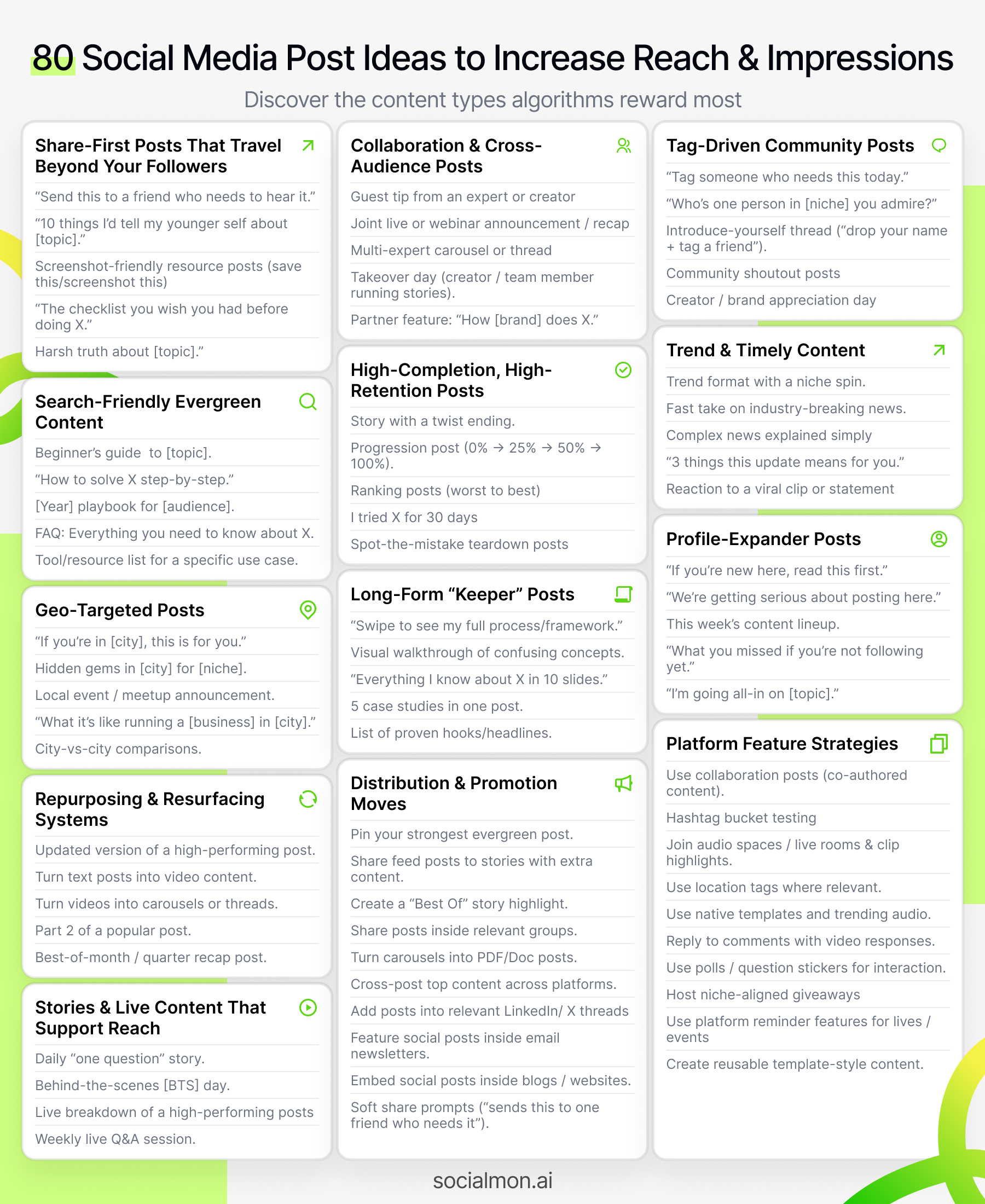
80 Social Media Post Ideas to Increase Reach and Impressions

If you want to increase reach and impressions, you need content that's deliberately built to:
- Be discovered by people who don't follow you yet
- Travel beyond your existing circle through shares, tags, and recommendations
- Work with the platform's distribution systems, not against them
This guide gives you 80 social media post ideas to increase reach and impressions, so you can reach more people and steadily grow visibility without burning out.
Inside Socialmon, we've looked at thousands of real posts across Instagram, TikTok, LinkedIn, YouTube, and X. The pattern is obvious: The posts that reach the most people are engineered for discovery. They're not random flukes.
Use this list as a practical playbook:
- Pick a few ideas that fit your brand
- Adapt them to your niche and platforms
- Run them as experiments over the next 30-90 days
- Double down on what consistently drives reach
A. Share-First Posts That Travel Beyond Your Followers
These posts are designed to be passed around in DMs, group chats, and Stories, which is one of the strongest drivers of reach and impressions.
1. "Send This to a Friend Who Needs to Hear It"
Create a short, powerful reminder or mindset shift, and explicitly ask people to send it to someone.
Why it helps reach
- Tagging or DM'ing pulls new people onto your post
- It feels personal, so people are more willing to share it
How to implement
- Choose a specific situation your audience struggles with:
- "Send this to a friend who's about to quit on their side hustle."
- "Send this to a designer who thinks they're not good enough."
- Keep the content:
- Short (1-3 lines max)
- Emotionally resonant (supportive, empowering, or clarifying)
- Visually simple (plain text graphic or a talking-head Reel with captions)
- Add a clear prompt in the caption:
- "If someone came to mind while reading this, send it to them."
Best formats
- Simple text graphic (Instagram, LinkedIn)
- Short vertical video with big on-screen text (Reels, TikTok, Shorts)
- Tweet-style graphic for multi-platform reuse
2. "10 Things I'd Tell My Younger Self About [Topic]"
Nostalgic, reflective posts spread across age groups and experience levels.
Why it helps reach
- People share it with friends, siblings, or colleagues: "Wish someone had told me this at 22."
- Works incredibly well for money, careers, fitness, freelancing, design, content, tech, etc.
How to implement
- Pick a specific topic, not just "life":
- Money, fitness, career, freelancing, marketing, engineering, parenting...
- List 10 concrete lessons, for example:
- "Stop trying to impress people who don't even remember your name."
- "Start investing earlier, even if it's a small amount."
- Make each line:
- Short enough to screenshot
- Specific enough that someone can nod and think "ugh, yes"
- End with a soft CTA:
- "Share this with someone younger than you."
- "Save this so you don't forget lesson #7."
Best formats
- Carousel (1 lesson per slide)
- Long caption text post
- Vertical video reading the list with B-roll in the background
3. "Screenshots You'll Want to Save for Later"
Turn your best tips, scripts, prompts, or frameworks into screenshot-friendly content.
Why it helps reach
- People save and resend these into Slack, WhatsApp, Discord, and email threads.
- High saves and shares signal to the platform that your post deserves broader distribution.
How to implement
- Pick one self-contained resource:
- DM scripts
- Outreach templates
- Ad hooks
- Debugging checklist
- Launch checklist
- Format it so it's easy to screenshot:
- Minimal decoration
- High contrast text
- Enough padding
- Clear heading like "Save this for later" or "Screenshot this"
- Add a caption that reinforces the action:
- "Screenshot this if you don't have time to implement it today."
- "Save this and use it next time you [do X]."
Best formats
- Single text image with a dense list
- 2-3 slide carousel
- Tweet-style graphic
4. "The Checklist You Wish You Had Before [Doing X]"
Checklists are team-share magnets. They easily get forwarded inside companies and communities.
Why it helps reach
- Teams share them internally before launches, campaigns, meetings, etc.
- One post can quietly circulate through multiple Slack workspaces or WhatsApp groups.
How to implement
- Pick one high-stakes moment your audience cares about:
- Launching a product
- Sending a big email campaign
- Running ads for the first time
- Presenting to stakeholders
- Shipping a new feature
- Turn your experience into a step-by-step checklist:
- Group into 3-5 sections (Before / During / After)
- Use short, clear items that can be quickly skimmed
- Example structure:
- "Pre-launch checklist for your first SaaS launch"
- Offer defined
- Landing page tested
- Tracking set up
- Warm-up content posted
- ...
- CTA examples:
- "Save this and run through it before your next launch."
- "Share this with the friend who always forgets step #3."
Best formats
- Carousel (title slide + sections)
- PDF/doc post (LinkedIn)
- Thread with checkboxes (X)
5. "The Harsh Truth No One Tells You About [Topic]"
A short, honest truth that feels like a wake-up call.
Why it helps reach
- People DM or tag others because it says what they're too scared to say aloud.
- Strong emotion + clear insight = very shareable.
How to implement
- Choose a topic your audience has unrealistic expectations about:
- Growing an account
- Getting clients
- Getting promoted
- Launching products
- Paid ads
- Write one sharp line that cuts through fluff, for example:
- "The harsh truth: your reach isn't low because of the algorithm, it's low because your posts are easy to ignore."
- "The harsh truth: posting more is not a substitute for a clear offer."
- Then, in the caption or subsequent slides:
- Explain the context (why this happens)
- Give 2-3 practical things they can do instead
- CTA:
- "Share this with someone who keeps blaming the algorithm."
- "Send this to your accountability partner."
Best formats
- Single bold text slide
- Talking-head video delivering the line up front
- Quote-style image for cross-posting
B. Collaboration & Cross-Audience Posts
If you want more reach, one of the fastest levers is to borrow attention from people who already have it.
Collabs, features, and shared content give you access to entire audiences that don't know you yet, while also sending strong distribution signals to the algorithm (more early engagement, more comments, more profile visits from new people).
6. "Guest Tip From [Expert / Creator / Brand]"
Feature a short, punchy tip from someone your audience already respects.
Why it helps reach
- The guest is likely to reshare the post with their audience.
- You gain authority and reach at the same time: you're seen alongside recognizable names.
How to implement
- Choose guests whose audience overlaps with yours (not random celebrities):
- If you're a SaaS founder: other SaaS operators, marketers, PMs, designers.
- If you're a fitness brand: physios, trainers, nutritionists.
- DM or email them a tight prompt:
- "What's one underrated tip for [audience] who want to [result]?"
- "What's one mistake you see people make with [topic]?"
- Turn their answer into:
- A carousel slide with their face, name, and handle
- A short quote Reel with them talking
- A text post with a pull quote
- Caption structure:
- Hook: "One tip from [expert] that can instantly boost your [result]..."
- Body: their tip + your quick commentary
- CTA: "Follow [@expert] for more on [topic]" + "Save this for your next [context]."
Best formats
- Carousel with 1 slide featuring the expert
- Short vertical video (them speaking or their quote over B-roll)
- LinkedIn post tagging them directly
7. "Joint Live / Webinar" Promo Post
Announce and recap co-hosted lives or webinars with other creators or brands.
Why it helps reach
- Lives and webinars often get extra notification and recommendation boosts.
- You tap into both audiences at once and capture replay views afterward.
How to implement
- Pick a co-host with:
- Similar audience
- Complementary expertise
- Agree on:
- A very specific topic ("How to launch without burning out" > "Marketing Q&A")
- A clear date/time
- Where it happens (IG Live, LinkedIn Live, YouTube Live, Zoom webinar)
- Create:
- Pre-event promo post:
- Title: "Live: [Very specific outcome] with [@partner] this [day/time]"
- 3 bullets on what people will learn
- CTA: "Comment 'LIVE' and we'll remind you" or "Tap 'Remind me' on the live."
- Post-event recap post:
- Key takeaways
- CTA: "Save this recap and tag someone who should watch the replay."
- Pre-event promo post:
Best formats
- Square graphics / carousels with both faces/logos
- Story reminders with countdown stickers
- LinkedIn event + LinkedIn post
8. "Collab Carousel / Thread With Multiple Experts"
Turn a single question into a multi-expert carousel or thread where every slide/tag brings new people.
Why it helps reach
- Each featured expert has a reason to share the post.
- Their followers see you as the hub curating useful voices in the niche.
How to implement
- Pick a question that your audience really cares about, like:
- "What's one thing you'd do to double your reach in 90 days?"
- "What's your best tip for landing your first 10 customers?"
- Ask 5-10 experts the same question (DM/email).
- Turn each answer into one slide / one tweet / one paragraph, including:
- Their name & handle
- Their role or context ("Founder at...", "Designer at...")
- Their quote, kept short
- Structure:
- Slide 1: Title ("10 creators share their best tip for increasing reach")
- Slides 2-11: Each expert's tip
- Final slide: "Which tip will you try first?" + CTA to follow you
Best formats
- Instagram carousel
- LinkedIn document post or text thread
- X thread with each expert in a separate tweet
9. "Takeover Day"
Let a creator, team member, or customer "take over" your account or Stories for a day.
Why it helps reach
- Takeovers introduce you to the guest's audience (they'll promote it).
- The format naturally creates curiosity among your existing followers.
How to implement
- Decide what kind of takeover makes sense:
- Team member: "Day in the life of our head of marketing/design/dev"
- Creator: "@creatorname shows how they use our product to [result]"
- Customer: "Follow [customer] as they run their [business type] day"
- Plan the structure:
- Intro post: "Tomorrow, @X is taking over our Stories to show you [benefit]."
- During the day: behind-the-scenes clips, tips, Q&A
- Recap post: "Here are the 5 best moments from yesterday's takeover."
- Make it easy for the guest:
- Provide a simple shot list or content outline
- Clarify brand boundaries (what's okay to show / say)
Best formats
- Instagram Stories (most common)
- TikTok or Reels series ("Takeover Day, Part 1/2/3")
- LinkedIn account takeover via posts + carousels
10. "Partner Feature: How [Other Brand] Does X"
Spotlight a complementary brand or tool and show how they do something clever or effective.
Why it helps reach
- The featured brand has a strong incentive to reshare the post.
- You build authority by anchoring yourself next to credible companies.
How to implement
- Choose brands/tools that:
- Your audience already uses or would benefit from
- Aren't direct competitors
- Have an audience size that makes a reshare meaningful
- Example angles:
- "How @toolname reduced churn using onboarding emails"
- "How @brandname uses UGC to boost their reach"
- "What we learned from @company's launch content"
- Structure the post:
- Hook: "What we can learn from @brand's approach to [topic]"
- Breakdown:
- Slide 1: Context (who they are, what they do)
- Slide 2-4: What they do well (specific examples/screenshots)
- Final slide: "How you can copy this for your own [situation]"
- Tag the brand clearly in the visual and caption.
Best formats
- Carousel breakdown (with screenshots)
- Short video teardown with commentary
- LinkedIn post with embedded media
C. Tag-Driven & Community-Oriented Posts
These formats nudge people to tag others and interact as a group, which pulls new accounts into your orbit and signals to the algorithm that your content is worth distributing further.
11. "Tag Someone Who Needs This Today"
A classic, but it works when the content is genuinely helpful.
Why it helps reach
- Every tag brings a new person to your post.
- Comment volume increases, which can boost your content in feeds and recommendations.
How to implement
- Create a post that delivers a specific, positive outcome:
- "You don't need to have it all figured out to start."
- "You're not behind; you're just on your unique timeline."
- "Here's what to do if your reach has tanked."
- In the last line of caption or on the slide:
- "Tag someone who needs this reminder today."
- "Tag a friend who's in this exact season."
- Make sure the content stands alone without the CTA; the "tag" line should feel natural, not desperate.
Best formats
- Single quote graphic
- Short Reel/TikTok with text overlay + voiceover
- Relatable meme with a supportive caption
12. "Who's One Person in [Niche] You Admire?"
Turn your comments into a celebration thread of niche players.
Why it helps reach
- People tag creators, coworkers, or mentors they admire → each tag brings someone new.
- Many of those tagged people will visit your profile or engage.
How to implement
- Choose a niche or role your audience cares about:
- "Who's one underrated designer you admire?"
- "Who's one founder you think deserves more credit?"
- "Tag one marketer whose content actually helps you."
- Keep the post itself simple:
- Hook: "Let's give some flowers today 💐"
- Body: "Comment one person in [niche] you admire and tell them why."
- Respond to some comments:
- Thank people
- Engage with tagged profiles
- Follow or bookmark those who align with your ecosystem
Best formats
- Text post with engaging caption
- Simple graphic with the prompt
- LinkedIn post where comments often travel far
13. "Introduce Yourself and Tag a Friend"
Turn your comments into a mini networking event.
Why it helps reach
- People tag colleagues / friends to join the "roll call".
- You get a concentrated burst of comments and profile visits.
How to implement
- Make the prompt easy and structured:
- "Drop your name, what you do, and ONE problem you're solving right now. Then tag a friend who should be in this community."
- Optionally, give a reason:
- "We're building a space for [audience] here - let's meet each other."
- Engage:
- Like and reply to introductions
- Group people ("lots of early-stage SaaS founders here!")
- Maybe DM a few to start deeper relationships
Best formats
- Text post with clear prompt
- Carousel with examples of how to intro yourself
- LinkedIn post (works extremely well for professional communities)
14. "Shoutout Post" Featuring Community Members or Customers
Spotlight 3-10 community members, customers, or followers.
Why it helps reach
- Featured people almost always reshare the content.
- Others in your audience feel encouraged to engage more, hoping to be featured next time.
How to implement
- Pick a clear theme:
- "5 community posts that nailed their content this week"
- "3 customers crushing it with [your product]"
- "4 designers from our community you should follow"
- For each shoutout:
- Add screenshot or headshot
- Include their handle
- Add 1-2 lines on what they did well
- Caption:
- Hook: "These 5 people from our community are doing incredible work right now."
- Body: mini blurbs
- CTA: "Go follow them / check their work - and comment below if you want more posts like this."
Best formats
- Carousel (each slide = one person)
- Story series with mentions
- LinkedIn multi-tag post
15. "Creator / Brand Appreciation Day"
Run a theme day where you encourage people to publicly appreciate others in your niche (and tag you).
Why it helps reach
- You generate multiple posts on other accounts that mention or tag you.
- Appreciation content tends to perform well because it's positive and specific.
How to implement
- Announce it in advance:
- "This Friday is 'Brand Appreciation Day'. Post about one creator/brand that's helped you this year, tag them and tag us so we can reshare some."
- Give a simple format:
- "Write what you appreciate, what they helped you with, and tag both of us."
- On the day:
- Repost some of the best appreciation posts to your Stories
- Comment and thank people
- Save the best ones for future UGC/social proof
Best formats
- Announcement post + Story
- Recap carousel with screenshots of the best appreciation posts
- LinkedIn or X thread tagging multiple people
D. Search-Friendly, Evergreen Content
Searchable, evergreen content continues to pull reach and impressions weeks or months after posting, especially on platforms with strong search and recommendations (Instagram, TikTok, YouTube, LinkedIn).
16. "Beginner's Guide to [Topic]"
A clear, keyword-rich guide that answers beginner questions in one place.
Why it helps reach
- People literally search "[topic] for beginners" or "beginner's guide to [topic]".
- These posts are often recommended to new users trying to learn that thing.
How to implement
- Pick a topic your audience frequently asks about:
- "Beginner's guide to email marketing in 2025"
- "Beginner's guide to strength training at home"
- "Beginner's guide to SaaS onboarding emails"
- Structure:
- Slide 1: Title ("Beginner's guide to [topic] in [year]")
- Slide 2: Who it's for + outcome
- Slides 3-7: Key steps / pillars
- Final slide: "Save this to start when you're ready."
- Use plain, searchable language in your title and caption:
- Include "beginner", "guide", "how to start [topic]".
Best formats
- Carousel
- LinkedIn document post
- YouTube video titled "Beginner's guide to..."
- TikTok / Reels playlist
17. "How to [Solve Specific Problem] Step by Step"
Very focused, step-by-step tutorials for a single, painful problem.
Why it helps reach
- People search for exact problem strings ("how to fix X", "how to stop Y").
- Step-by-step content gets saved and used as a reference.
How to implement
- Identify one high-value problem:
- "How to fix low reach on Instagram in 30 days"
- "How to write your first sales page step by step"
- "How to stop getting ghosted on sales calls"
- Structure:
- Hook: "Struggling with [problem]? Here's how to fix it step by step."
- Steps: 3-7 clear, numbered steps
- Each step: what to do, with simple examples
- Caption:
- Reuse the "How to [solve problem]" phrasing
- Add extra detail for those who read deep
Best formats
- Carousel
- Short-form video walking through each step
- X / LinkedIn thread
18. "[Year] Playbook for [Audience]"
Time-stamped guides that frame you as up-to-date and forward-looking.
Why it helps reach
- The year in the title signals freshness (e.g. "2025 playbook for...").
- People save it as a reference document to revisit throughout the year.
How to implement
- Define your audience clearly:
- "2025 playbook for solo SaaS founders"
- "2025 playbook for freelance designers"
- "2025 Instagram reach playbook for coaches"
- Include:
- What changed vs last year
- 3-7 key priorities or pillars
- Suggested cadence or roadmap
- You can update this annually and repost as a new anchor piece.
Best formats
- Carousel
- LinkedIn doc post
- Long-form YouTube or blog post → cut into social snippets
19. "FAQ: Everything You Need to Know About [Topic]"
Turn your most common DMs and questions into a single FAQ post.
Why it helps reach
- FAQs map directly to common search queries.
- You can pin them or reference them often, driving recurring impressions.
How to implement
- Collect real questions:
- From DMs
- From comments
- From sales calls
- From support tickets
- Pick 5-10 most common questions around a tight topic:
- "FAQ: everything you need to know about UGC deals"
- "FAQ: everything you need to know about IUI prep" (in your case, other niche)
- "FAQ: everything you need to know about Instagram reach in 2025"
- Format:
- Slide 1: Title
- Each subsequent slide: Q + short, clear A
- Final slide: "Save this and send it to anyone asking you the same question."
Best formats
- Carousel
- LinkedIn document
- Pin as a highlight/featured post
20. "[X] Tools / Resources for [Very Specific Use Case]"
Curated resource lists that your audience will absolutely share with their team.
Why it helps reach
- People send tool lists in Slack channels and private chats.
- You often get saved as "that account that always has good resources".
How to implement
- Pick a specific use case:
- "7 free tools for founders who hate marketing"
- "5 tools to improve your Instagram reach without posting more"
- "10 resources for junior devs trying to move into frontend roles"
- For each tool/resource:
- Name + 1-line description
- Optional "best for" tag (e.g. "best for solo founders", "best for templates")
- CTA:
- "Save this so you don't have to re-Google everything later."
- "Share this with a friend who's overloaded with tool decisions."
Best formats
- Carousel with 1 tool per slide
- Document post with all tools listed
- Thread with each tool as its own bullet/tweet
E. High-Completion, High-Retention Posts
Platforms reward posts that people watch or read to the end. Higher completion and watch time often translate into more reach and impressions, because your content looks "satisfying" to the algorithm.
These ideas are designed to keep people hooked start-to-finish.
21. "Story With a Twist at the End"
Tell a story that clearly hints something unexpected will happen.
Why it helps reach
- Curiosity keeps people watching/reading until the twist.
- High completion rate = strong signal to boost your post into more feeds.
How to implement
- Pick a real story with a turning point:
- "I almost deleted this email. Then it made us $20k."
- "We nearly killed this feature. Now it's our #1 growth driver."
- Structure:
- Hook that foreshadows the twist ("I almost..." / "I was about to...").
- Setup: what you believed/expected.
- Tension: what went wrong or felt risky.
- Twist: surprising outcome.
- Takeaway: what others can learn.
- Keep the twist and takeaway in the last slide or last 3-4 seconds of the video.
Best formats
- Reels / TikTok with storytelling voiceover
- Carousel with 1-2 lines per slide
- LinkedIn text post broken into short paragraphs
22. "Progression Reel / Carousel"
Show a transformation at multiple stages: 0 → 25% → 50% → 75% → 100%.
Why it helps reach
- People stick around to see the "after".
- Transformation content is highly shareable in group chats and communities ("this is what's possible").
How to implement
- Choose a transformation your audience cares about:
- Design revamp
- Gym progress
- Landing page improvements
- Product UI overhaul
- Follower/revenue growth visualized over time
- Show real stages:
- Slide/clip 1: "Before"
- Slides/clips 2-4: intermediate stages (label them clearly)
- Final slide/clip: "After + what changed"
- Caption:
- Briefly explain the timeline (e.g. 90 days, 6 months)
- Call out 2-3 key decisions that made the biggest difference
- CTA: "Save this if you're at the 'before' stage right now."
Best formats
- Reel/TikTok with quick cuts or time-lapse
- Carousel with side-by-side screenshots
- YouTube Short with step labels and text overlays
23. "Ranking Post: Worst to Best"
Rank tools, tactics, mistakes, or ideas from worst to best (or vice versa).
Why it helps reach
- People keep swiping to see what gets the #1 spot.
- Rankings trigger comments ("I disagree", "#4 should be higher"), which boosts distribution.
How to implement
- Pick something your audience debates:
- "Ranking 7 content formats from weakest to strongest for reach."
- "Ranking marketing channels for bootstrapped founders."
- "Ranking landing page sections by impact."
- Structure:
- Slide 1: "Ranking [X] from worst to best for [result]."
- Each slide: rank, short reason, and when to use/avoid it.
- Final slide: "Agree/disagree? Comment your ranking."
- Keep it honest; don't just rank what you sell as #1 with no nuance.
Best formats
- Carousel (ideal)
- Thread with one tweet/post per rank
- Video walking through the ranking with on-screen labels
24. "I Tried X for 30 Days - Day 1 vs Day 30"
Document an experiment start to finish.
Why it helps reach
- Serialized, time-bound experiments feel like mini reality shows.
- People follow along and share the recap with others.
How to implement
- Choose an experiment that maps to your audience's goals:
- Posting Reels daily
- Emailing your list daily
- Cold outreach every weekday
- Walking 10k steps for 30 days
- Content flow:
- At the beginning: announce the challenge + what you're measuring.
- During: post short updates (weekly or a mid-point check-in).
- At the end: publish a recap post comparing Day 1 vs Day 30 (results + lessons).
- Recap post elements:
- Before vs after metrics
- What actually drove the change
- What you'd keep vs drop
Best formats
- Reel/TikTok recap with Day 1 / Day 30 split
- Carousel with graphs/screenshots
- Long-form LinkedIn post summarizing learnings
25. "Can You Spot What's Wrong?"
Turn spot-the-mistake into a high-retention and high-comment format.
Why it helps reach
- People stop scrolling to scrutinize the image/text.
- They comment guesses, which boosts engagement → reach.
- The reveal keeps completion rate high.
How to implement
- Pick something your audience recognizes:
- A landing page
- An ad
- A Figma design
- A line of code
- A sales email
- Create:
- Slide/clip 1: "Can you spot what's wrong with this?"
- Give people a moment (don't reveal immediately).
- Next slide/clip: circle the issue and explain why it matters.
- Final slide: optional bonus tip.
- Encourage participation:
- "Comment what you think is wrong before you swipe."
- "Did you notice this too?"
Best formats
- Carousel with zoomed-in screenshots
- Reel with a pause before the reveal
- X/LinkedIn post with screenshot + reply thread explaining
F. Trend & Timely Content for Explosive Reach
Trends and timely topics can give you fast, broad reach when used strategically. The key is to use them to pull the right people in, not just chase random virality.
26. "Trend Format, But Niche Spin"
Use a trending sound, meme, or visual template, but align it tightly to your niche.
Why it helps reach
- Algorithms are already pushing the trend.
- Your niche-specific twist makes it shareable among your ideal audience.
How to implement
- Scan trending audios/templates:
- On TikTok/Reels audio pages
- Inside your own niche feeds
- Ask:
- "How does this trend show up for my audience's real life?"
- Example: instead of generic dating jokes, you show "client feedback vs actual scope" for designers.
- Keep:
- The core trend structure (beat, joke timing, visual pattern)
- But change the text/caption to reflect your niche situation
Best formats
- Reels / TikToks with trending audio
- Meme-style images using recognizable formats (Drake meme, etc.)
27. "Fast Take on a Breaking Change in Your Industry"
Be one of the first people to explain what just happened.
How to implement
- Watch for:
- Algorithm updates
- Policy changes
- New features
- Major market shifts
- Move fast:
- Within 24-48 hours, publish a simple breakdown:
- What happened
- Why it matters
- 2-3 things your audience should do next
- Within 24-48 hours, publish a simple breakdown:
- Title examples:
- "Instagram just changed how reach works. Here's what it means."
- "New LinkedIn feature: [Name]. Should you care?"
Best formats
- Short video explainer
- Carousel with "What / Why / Now what" slides
- X/LinkedIn text post with clear bullets
28. "Explaining a Complex News Event in Simple Terms"
Act as the translator for your audience.
How to implement
- Choose something complex but relevant:
- Policy changes
- Economy shifts
- Platform privacy updates
- Technical changes (e.g. iOS tracking, ad rules)
- Framework:
- "Explain it like I'm 5 / new / non-technical."
- Use analogies and everyday language.
- Break it down into:
- What happened
- Why it matters
- What changes (for your audience)
- What to do
Best formats
- Carousel with clear, roomy text
- Video with subtitles and simple visuals
- Long caption post with bold subheadings
29. "3 Things [Big Announcement] Means for [Audience]"
Don't just repeat news. Extract implications.
How to implement
- Take a big announcement:
- New platform feature
- Funding news in your industry
- Major acquisition
- Regulation/new law
- For your specific audience:
- "3 things [new update] means for freelance designers."
- "3 things this iOS change means for ecom brands."
- Each point:
- One concise change
- One sentence on what to adjust/prepare
Best formats
- Carousel
- LinkedIn or X post with numbered bullets
- Short video with on-screen text highlights
30. "My Reaction to [Viral Trend or Statement]"
Attach your brand to an existing viral conversation with a clear POV.
How to implement
- Pick a viral clip, tweet, or trend in your niche.
- Decide your stance:
- Agree but add nuance
- Respectfully disagree
- Show a missing angle
- Formats:
- Duet/stitch (TikTok)
- "Reacting to [clip] as a [role]" video
- Screenshot + your commentary in the caption
- Limit yourself to one main point so it stays digestible.
Best formats
- Duet/stitch videos
- React-style content (facecam + overlay)
- Quote tweet with extended commentary
G. Geo-Targeted & Niche-Community Posts
These ideas are especially powerful for local businesses, events, or communities, and for global brands that want deeper reach in specific clusters (e.g. "designers in Berlin", "developers in SF").
31. "If You're in [City/Region], This Is for You"
Lead with location so locals immediately stop scrolling.
How to implement
- Start your hook with location:
- "If you're in Singapore and work in tech, this is for you."
- "If you're a small business owner in London, read this."
- Then:
- Share something uniquely useful to that group:
- A tip
- A resource list
- A meetup
- A common struggle/story
- Share something uniquely useful to that group:
- Always:
- Use location tags
- Consider relevant local hashtags (city, neighborhood, community)
Best formats
- Reel/TikTok with location in text overlay
- Carousel with local photos or context
- LinkedIn post targeting professionals in that city
32. "Hidden Gems in [City] for [Audience]"
Curate location + niche recommendations.
How to implement
- Pick a city and audience:
- "Hidden gems in Singapore for remote workers."
- "Hidden gems in NYC for coffee-obsessed founders."
- "Hidden gems in Berlin for UX designers."
- For each spot:
- Name + 1-line why it's great for that audience
- Optional: what to order / what to do there
- CTA:
- "Save this for your next workday adventure."
- "Tag a friend you'd bring here."
Best formats
- Carousel with one place per slide
- Reels/TikToks with short clips of each place
- Blog → micro social snippets
33. "Local Event / Meetup Announcement"
Promote IRL or virtual events targeted to people in a specific location or community.
How to implement
- Be specific:
- "Free Figma jam session this Saturday in Singapore (for product designers)."
- "Casual coffee meetup for SaaS founders in Austin."
- Include:
- Date, time, location / link
- Who it's for
- What will happen (agenda/theme)
- How to RSVP
- Consider:
- Posting a recap afterward ("Here's what went down + what we learned") to extend reach.
Best formats
- Feed post with event graphic
- Stories with countdown stickers
- LinkedIn event + post
34. "What It's Really Like Running a [Business Type] in [City]"
Share behind-the-scenes of operating in a specific place.
How to implement
- Combine role + location:
- "What it's really like running a café in Tokyo."
- "What it's really like being a bootstrapped founder in Singapore."
- "What it's really like freelancing as a designer in Dubai."
- Cover:
- Real wins
- Real struggles (rent, clients, bureaucracy, community)
- Things people don't see on Instagram
- CTA:
- "If you're doing this in [city], tell me if this matches your experience."
- "Tag a friend in [city] who needs to see they're not alone."
Best formats
- Story-style video
- Long-form LinkedIn post
- Carousel with text + photos
35. "City vs City Comparison"
Playfully compare two cities or regions from your audience's perspective.
How to implement
- Choose a relevant contrast:
- "Remote workers in Singapore vs Bali."
- "Startup life in SF vs Berlin."
- "Design salaries in London vs Lisbon (rough ranges)."
- Format:
- Split-screen visual or side-by-side slides
- Simple comparisons:
- Cost of living
- Vibe
- Community
- Coffee
- Wi-Fi
- Work hours
- Keep it respectful and light; aim for fun, not divisive.
Best formats
- Carousel (each slide = one comparison)
- Meme-style split image
- Short video flipping between locations
H. Carousel, Thread & Long-Form "Keeper" Posts
These posts are built to be saved, re-read, and shared in Slack/WhatsApp/Discord. They might not always explode on day one, but they quietly rack up reach and impressions over weeks and months.
36. "Swipe to See My Whole [Process / Framework]"
Turn one of your core processes into a swipeable or scrollable asset.
How to implement
- Pick a process your audience constantly asks you about:
- "My full content repurposing system in 7 steps."
- "Our product launch checklist from idea to go-live."
- "My 5-step onboarding framework for new clients."
- Structure:
- Slide 1: Hook ("Swipe to see my whole [process]")
- Slides 2-7: One clear step per slide (title + 2-3 lines)
- Final slide: "Save this and send it to your team."
- Keep steps simple but specific. People should feel, "I can test this this week."
Best formats
- Instagram carousel
- LinkedIn document post
- X/Threads multi-post thread
37. "From Confused to Clear: Visual Walkthrough of [Concept]"
Turn confusing topics into simple, visual explainers.
How to implement
- Pick a complex idea your audience struggles with:
- Funnels vs flywheels
- Attribution models
- Ad account structure
- Pricing strategy basics
- Frontend concepts, etc.
- Create one visual that shows:
- A flow (arrows)
- A hierarchy (stack, pyramid)
- A decision tree ("if this, then that")
- Caption:
- Explain the visual in simple language
- Add 1-2 examples of how to use it
Best formats
- Single image with detailed caption
- Carousel zooming into different parts of the diagram
- LinkedIn document post
38. "Everything I Know About [Topic] in 10 Slides"
A mini-masterclass condensed into one post.
How to implement
- Scope the topic: not "marketing", but "email list growth", "Instagram hooks", "IUI prep for beginners", etc.
- Promise a compact but dense resource:
- "Everything I know about getting your first 1,000 followers in 10 slides."
- "Everything I know about client onboarding in 8 steps."
- Structure:
- Slide 1: Big promise
- Slides 2-9: Key principles / steps / mistakes
- Slide 10: Summary + "save & share"
Best formats
- Carousels
- LinkedIn docs
- Threads with 10 numbered posts
39. "5 Case Studies in One Post"
Bundle multiple mini case studies around the same theme.
How to implement
- Choose a focus:
- "5 posts that doubled reach (and why they worked)."
- "5 clients who fixed their churn (5 different approaches)."
- "5 product launches that nailed their first week."
- For each mini case:
- Who/what it was (blur details if needed)
- Key move
- One measurable result
- 1-2 learnings
- CTA:
- "Save this as a playbook for your next [campaign type]."
Best formats
- Carousel (1 case per slide)
- LinkedIn document
- X thread
40. "10 Hooks / Headlines That Worked for Me (With Numbers)"
Share real hooks + real results.
How to implement
- Go through your analytics and find posts that:
- Outperformed your normal reach
- Got more saves or profile visits than usual
- Extract the hooks/headlines:
- "I almost deleted this email. Then it made us $20k."
- "If your reach tanked this year, read this."
- For each:
- Show the hook
- Short description of the post
- Key metric ("4x average reach", "2x saves", etc.)
Best formats
- Carousel with 1 hook per slide
- Document post
- Thread with one hook per tweet
I. "Profile-Expander" Posts That Drive People to Click Your Name
These ideas are designed to increase profile visits and make people explore more of your content, which boosts impressions across your entire account.
41. "If You're New Here, Read This First"
A "start here" post for new followers and lurkers.
How to implement
- Cover three things:
- Who you are
- Who you help
- What they can expect from your content (topics, frequency)
- Add links or directions:
- "Best place to start: [highlight name]"
- "Check my 'Start Here' highlight for my frameworks."
- Pin it at the top of your profile.
Best formats
- Carousel (with intro, what you share, your best content)
- LinkedIn "about" style post
- Short video introducing yourself
42. "We Just Got Serious About Posting Here"
Announce a new content commitment.
How to implement
- Be specific:
- "We're finally taking LinkedIn seriously - expect 3 posts a week on [topics]."
- "From this month, we're sharing one deep-dive carousel per week on [outcome]."
- Include:
- Sample topics coming up
- Why you're doing this
- What followers will gain
- CTA:
- "Follow if you want to see how this experiment goes."
- "Turn on notifications if you don't want to miss it."
Best formats
- Text post with strong hook
- Short announcement Reel/Story
- LinkedIn post with preview of the new series
43. "This Week's Lineup"
Preview your content schedule like a TV guide.
How to implement
- Once a week, post something like:
- "This week:
- Tue: 5 hooks that doubled our reach
- Thu: teardown of a post that flopped
- Sat: Q&A about your content experiments"
- "This week:
- Use clear days + topics.
- Optionally, ask:
- "Which one are you most excited about? Comment the day."
Best formats
- Carousel with 1 slide per day
- Simple text graphic
- LinkedIn post / X thread of the schedule
44. "What You Might Have Missed If You Aren't Following Yet"
Recap your best recent posts in one place.
How to implement
- Once a month or quarter:
- Pick 3-6 top posts based on reach/saves/shares.
- Create a recap:
- Slide 1: "What you might have missed if you aren't following yet."
- Slides 2-X: Thumbnail + title + key takeaway + posted date.
- Caption:
- "If you missed any of these, scroll back on our profile and save the ones that apply to you."
Best formats
- Carousel
- LinkedIn document
- Story highlight teaser
45. "I'm Going All-In on [Topic] Here"
Sharpen your positioning publicly.
How to implement
- Fill in:
- "I'm going all-in on [topic] here."
- "If you care about [result] as a [audience type], this account is for you."
- Mention:
- What you're not going to post (optional but powerful)
- Types of content you'll focus on (e.g. case studies, experiments, audits, behind-the-scenes)
- CTA:
- "Follow if you want [result]."
- "Send this to a friend who's also obsessed with [topic]."
Best formats
- Text post
- Short talking-head video
- Carousel with "what this account is now about"
J. Repurposing & Resurfacing Posts for More Impressions
You don't always need new ideas to get more reach. Often, the fastest wins come from reworking and resurfacing what already performed well.
46. "Update of a High-Performing Post"
Take a past hit and post the 2025 version (or latest).
How to implement
- Find a post that:
- Outperformed your average reach
- Is still relevant (evergreen topic)
- Update:
- Stats, screenshots, examples, or tools
- Add "what we've learned since"
- Title:
- "The 2025 version of our most saved post on [topic]."
- "We updated our popular [topic] checklist - here's the new version."
Best formats
- Carousel
- Thread
- Short video summarizing "then vs now"
47. "From Text to Video"
Turn your best-performing text-based content into short-form video.
How to implement
- Find:
- Top-performing threads, LinkedIn posts, or carousels.
- Turn them into:
- Reels/TikToks/Shorts:
- 1 hook line on screen
- You talking through the main points
- Key phrases as text overlays
- Reels/TikToks/Shorts:
- Keep each video focused on one main idea from the original post.
Best formats
- Reels / TikTok / Shorts
- Story-style vertical video
48. "From Video to Carousel / Thread"
Flip the direction: turn high-retention videos into swipeable or scrollable content.
How to implement
- Identify videos that:
- Have high watch time
- Earned lots of saves or positive comments
- Transcribe key ideas and convert into:
- Carousel slides (one micro-point per slide)
- LinkedIn/X thread with 1-2 sentences per post
- Plug your original video in the caption:
- "If you prefer video, the original breakdown is pinned."
Best formats
- Carousels
- LinkedIn/X threads
- Document posts
49. "Part 2 of a Popular Post"
When something hits, don't just thank the algorithm. Extend it.
How to implement
- Find a post that:
- Got significantly above-average reach or comments
- Sparked questions like "Can you do a part 2?"
- Create:
- "Part 2: 5 more [X] you can try."
- "Follow-up: what happened after we tried [experiment] again."
- "Advanced version of [topic] we covered last week."
- In the caption:
- Link back to Part 1 ("If you missed Part 1, scroll back to [date] or look for [title].")
Best formats
- Carousel
- Thread
- Short video sequel
50. "The Best of [Month / Quarter]: Top 5 Posts You Shouldn't Miss"
Package your own wins into a recap asset.
How to implement
- Every month or quarter:
- Pick 3-5 top posts based on reach/saves/shares
- Create a recap:
- Structure:
- Slide 1: "Best of [Month/Quarter]: [#] posts you shouldn't miss."
- Slides 2-X:
- Thumbnail/screenshot
- Short title
- Why it mattered
- Where to find it on your profile
- CTA:
- "Save this so you have all the good stuff in one place."
Best formats
- Carousel recap
- LinkedIn document
- Story highlight titled "Best of [Q1/Q2/etc.]"
K. Distribution & Promotion Moves That Multiply Reach
These ideas are less about what you post and more about where and how you surface it. Smart distribution can multiply impressions without creating more content.
51. Pin Your Strongest Evergreen Post
Put your best "reach magnet" at the top of your profile.
How to implement
- Choose a post that:
- Explains a core framework or process
- Has strong saves/shares
- Is still relevant 3-12 months from now
- Pin it and periodically review:
- If another post consistently beats it, swap.
Best formats
- Evergreen checklist or framework
- "Start here" style guide
- Case study that clearly shows results
52. Share Posts to Your Stories With Added Context
Don't just hit "share to Story" and call it a day-sell the click.
How to implement
- When you share your feed post to Stories, add:
- A short hook: "This is the post that 4x'd our reach last week."
- A poll, emoji slider, or question sticker on top.
- A clear CTA: "Tap to see the full breakdown."
- Consider resharing:
- 24-48 hours after the original post
- At a different time of day
Best formats
- Instagram Stories
- Facebook Stories
- LinkedIn repost with added commentary
53. Create a "Best Of" Story Highlight
Turn your best-performing posts into a bingeable highlight.
How to implement
- Create a Highlight called "Start Here", "Best Posts", or "[Topic] 101".
- Add:
- Stories that feature or summarize your best feed posts
- Evergreen tips and frameworks
- Links back to original posts when relevant
- Refresh this Highlight quarterly so it doesn't get stale.
Best formats
- Story highlight on Instagram
- Pinned Story-like features on other platforms (where available)
54. Share Content into Relevant Groups or Communities
Don't just rely on the feed-go where your audience already hangs out.
How to implement
- Identify 3-5 communities:
- Slack groups
- Discord servers
- Facebook groups
- Subreddits (respecting rules)
- Niche LinkedIn groups
- Share only:
- Highly educational posts (no hard selling)
- Case studies, frameworks, checklists
- Add context:
- "We just posted this breakdown on [topic] and thought it might help this group."
Best formats
- Link + screenshot + context in group posts
- Native uploads where possible (e.g. LinkedIn docs)
55. Turn Your Post into a PDF / Doc and Share Natively
Some platforms (especially LinkedIn) give extra distribution to document posts.
How to implement
- Take a carousel or multi-step post and export as PDF.
- Upload as a native document with a strong title:
- "Reach & Impressions Checklist (Free PDF)"
- "Content Experiment Planner - 7 Pages"
- Add a caption that:
- Tells people what to expect
- Prompts them to save or share with their team
Best formats
- LinkedIn document posts
- PDF uploads to community platforms
56. Cross-Post Top Content to a Second Platform
Not everything deserves to be cross-posted. Your winners do.
How to implement
- Identify:
- Your top-performing Reels → post to TikTok/Shorts
- Strong LinkedIn posts → thread on X
- Carousels → LinkedIn documents
- Adjust:
- Hook (to match platform culture)
- Caption length and CTA
- Hashtags/tags
Best formats
- Short-form video between platforms
- Carousels ↔ threads ↔ docs
57. Add Posts to Relevant X / LinkedIn Threads
Piggyback on existing conversations instead of shouting into the void.
How to implement
- Look for:
- Threads on topics you've created strong content about
- Influencers or brands asking for examples/resources
- Reply with:
- A 1-2 line summary of your insight
- A link or image of your relevant post
- Context: "We just broke this down in detail here."
Best formats
- X replies
- LinkedIn comments with attachments/screenshots
58. Include Social Posts in Your Email Newsletter
Use your email list to push impressions back to your social posts.
How to implement
- Weekly or monthly:
- Feature 1-3 posts in your newsletter:
- Screenshot + link
- Or embed where possible
- Feature 1-3 posts in your newsletter:
- Positioning:
- "Post of the week"
- "This carousel got the most saves - here's why."
Best formats
- Short "roundup" section in your newsletter
- Dedicated email when a post sparks huge conversation
59. Feature Social Posts on Your Website or Blog
Let your website traffic work for your social reach.
How to implement
- Identify 3-5 evergreen posts that:
- Explain a concept covered in a blog
- Show a framework related to the article
- Share a case study that fits the topic
- Embed those posts:
- In your blog content
- On your "Resources" or "Case Studies" pages
Best formats
- Embeds of Instagram/LinkedIn/X posts
- Screenshots with links
60. End Posts with a Soft Share Prompt
Invite shares without sounding desperate.
How to implement
- Add a soft CTA at the end of some posts:
- "If this helped, send it to one person who needs it."
- "Share this with your team before your next sprint."
- "Save this so you don't have to rebuild it from scratch."
- Don't use this on every single post; 20-30% is plenty.
Best formats
- Any post that's genuinely helpful, not just self-promotional
L. Smart Use of Platform Features to Get More Reach
These ideas use native platform tools (collabs, hashtags, sounds, polls, etc.) to make the algorithm more likely to favor you.
61. Use Collaboration Posts (Where Available)
Leverage features like Instagram Collabs to publish one post to two profiles.
How to implement
- Invite collaborators:
- Complementary brands
- Creators who serve the same audience
- Customers with strong personal brands
- Structure:
- Content that makes sense for both audiences
- Clear joint value (e.g. joint checklist, interview, teardown)
Best formats
- Instagram Collab posts
- Co-authored LinkedIn posts (where available)
62. Test 2-3 Hashtag Buckets Per Month
Treat hashtags like testable labels, not magic.
How to implement
- Create 2-3 "buckets":
- Bucket A: Niche topic tags (#emailcopywriting, #devtoolsmarketing)
- Bucket B: Industry tags (#b2bsaas, #ecom)
- Bucket C: Audience identity tags (#founder, #uxdesigner)
- For a month:
- Use one bucket per post type, track which bucket tends to give more reach.
Best formats
- Instagram posts
- LinkedIn posts (with a handful of tags)
- TikToks with topical tags
63. Join Audio Spaces / Live Rooms and Clip Highlights
Use audio/live features to create content you can clip later.
How to implement
- Host or join:
- X Spaces
- LinkedIn Audio events
- IG Live panels
- Record (where allowed).
- Afterwards:
- Cut the most insightful 30-60 seconds into short-form videos.
- Tag co-speakers and mention the original Space/Live.
Best formats
- Reels, TikToks, Shorts
- Carousel recaps with quotes
64. Use Location Tags on Relevant Posts
Simple, but often ignored: location tags.
How to implement
- Add location tags when:
- You talk about a specific city
- You host an event
- You run a local business
- Avoid spamming irrelevant locations; keep it accurate.
Best formats
- Instagram posts and Reels
- TikToks with location set
- Facebook posts with check-ins
65. Experiment With Platform-Native Audio / Templates
Use built-in templates and trending sounds strategically.
How to implement
- Try:
- IG Reels templates
- TikTok templates
- Native subtitle tools
- Trending audios relevant to your niche
- Always keep your content on-topic, even when using broad trends.
Best formats
- Reels/TikToks that use trending templates
- Short, punchy educational or relatable clips
66. Reply to Comments With New Short-Form Videos
Turn good comments into new content hooks.
How to implement
- On TikTok/Reels/Shorts:
- Pick insightful or common questions.
- Reply with a video addressing that question.
- Show the original comment on-screen.
- Caption:
- "Answering this question from [@name]. Drop yours below."
Best formats
- TikTok comment replies
- Reels with comment screenshots
- Shorts Q&A
67. Use Polls and Question Stickers in Stories
Stories are lightweight but powerful for keeping your account "warm."
How to implement
- Use simple prompts:
- Polls: "Do you care more about reach or leads right now?"
- Questions: "Ask me anything about increasing impressions this month."
- Sliders: "How 'seen' do you feel by the algorithm right now?"
- Share interesting answers (anonymously if needed).
Best formats
- Instagram Stories
- Facebook Stories
68. Host Platform-Native Giveaways (Within Policy)
Thoughtful giveaways can drive reach when aligned to your niche.
How to implement
- Choose niche-relevant prizes:
- Your product, consulting, tools, resources
- Avoid generic prizes like iPads if you care about follower quality.
- Keep rules simple:
- Follow + like + comment + optional share/tag
- Clearly state dates, number of winners, and how you'll pick them.
Best formats
- Feed post
- Reel with overlay text
- Story reminders during the giveaway window
69. Use Platform Reminders for Lives or Events
Take advantage of reminder features (e.g. live countdowns, scheduled events).
How to implement
- Schedule:
- Lives
- Webinars
- Product announcements
- Turn on reminders:
- IG Live reminders
- LinkedIn event reminders
- YouTube live reminder buttons
- Promote:
- In Stories/posts leading up to the event
- With countdown and "remind me" stickers
Best formats
- Live sessions
- Scheduled events with native reminders
70. Create Templates Using Platform Tools
Build templates others can reuse-and let the platform credit you.
How to implement
- Create:
- Reel templates with specific text slots
- Story templates ("Share your weekly goals" frame)
- Simple design templates people can screenshot or reuse
- Encourage use:
- "Use this template and tag me so I can see your version."
Best formats
- Reels templates on Instagram
- Story templates shared in Highlights
M. Stories & Live Content That Feed Your Feed
Stories and live content are powerful support channels. They don't always explode on their own, but they help your feed posts get more reach by keeping engagement and familiarity high.
71. Daily "One Question" Story for Your Niche
Ask one simple question in Stories every day.
How to implement
- Keep it tight:
- "What are you struggling with in [topic] today?"
- "What's one win you had this week?"
- "Are you focusing more on reach or sales right now?"
- Use:
- Polls, question stickers, or simple text replies
- Repost selected answers (with or without names).
Best formats
- Instagram Stories
- Facebook Stories
72. Behind-the-Scenes Day in Stories
Show the messy middle, not just polished posts.
How to implement
- Once a week or month, show:
- Your content planning
- Analytics review
- Filming/editing process
- Launch prep, etc.
- Make it useful:
- Add quick tips in text overlays ("We look at saves before likes", etc.).
Best formats
- Raw Story clips
- Short vertical videos later repurposed as Reels
73. Live Breakdown of a Popular Post
Go live to dissect a post that did well (yours or someone else's).
How to implement
- Choose a post with strong reach/saves.
- In the live:
- Explain the hook
- Break down the structure
- Talk through the CTA and comments
- Afterward:
- Clip highlights into short-form videos
- Create a carousel recap ("5 things we learned from this breakdown").
Best formats
- Instagram/LinkedIn/YT Live
- Repurposed Reels/Shorts



Get 50 viral posts for your niche (free)