500+ Social Media Post Ideas to Never Run Out of Content Again

If you're staring at a blank content calendar thinking, "What do I even post this week?" you're not alone.
Founders, marketers, and creators ask the same questions over and over:
- "I've run out of ideas."
- "What do I post that isn't just 'buy my product'?"
- "How do I do this consistently without social taking over my life?"
The good news: you don't actually need 500 random ideas.
You need a repeatable system that can quietly generate unlimited social media post ideas for your brand - across platforms, niches, and formats.
This guide gives you that system, plus a huge bank of plug-and-play templates you can start using immediately.
Quick tip before we start: One of the fastest ways to understand what's "follow-worthy" is to look at real posts from accounts you admire. Inside Socialmon, you can collect posts that made you want to follow - then reverse-engineer why they worked: hooks, structure, pacing, CTAs, visuals, and more.
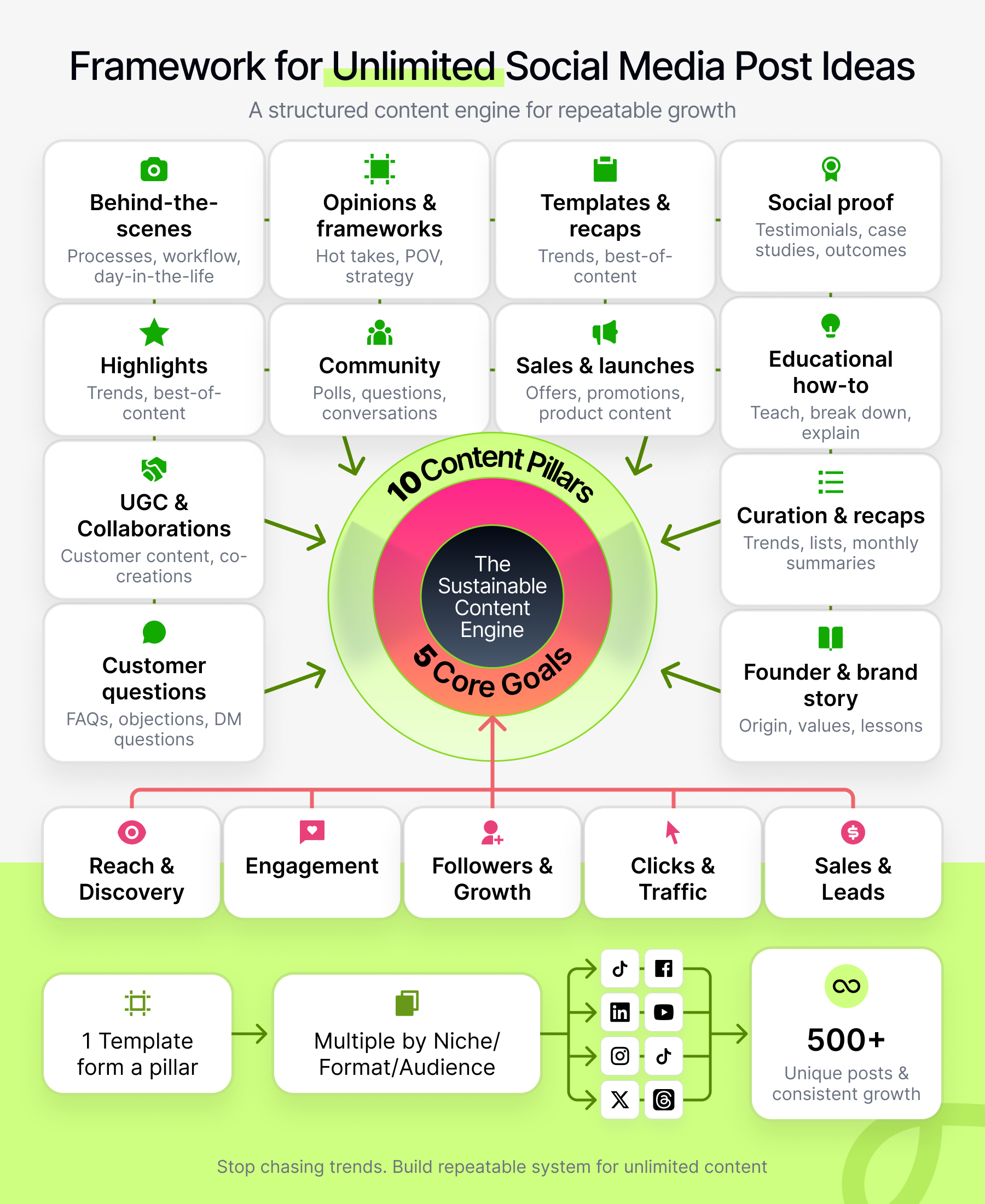
How This Guide Works (and How It Becomes 500+ Ideas)
Instead of throwing a giant, disconnected list at you, we'll organize everything with a simple framework.
5 Content Pillars (what the post is)
- Education - teach, explain, break down.
- Proof - testimonials, case studies, outcomes, results.
- Connection - founder/brand story, values, opinions.
- Community - engagement, UGC, questions, collaboration.
- Promotion - launches, offers, product-focused content.
5 Core Goals (what the post does)
- Reach & discovery
- Engagement (comments, saves, shares)
- Followers & list growth
- Clicks & traffic
- Sales & leads
Every idea in this article is a template, not a one-off.
You can turn each template into dozens of posts by:
- Swapping in your niche (SaaS, e-commerce, local services, creator, education, etc.)
- Changing the goal (engagement vs sales vs traffic)
- Adapting the format (Reel/TikTok, carousel, static image, LinkedIn text, story, email)
100 templates × niches × goals × formats = easily 500+ unique social media posts without stretching the truth.
Let's dive into the pillars.
Pillar 1: Behind-the-Scenes & Process Content
People are obsessed with how it really works. They want to see what's behind the polished website: your process, your tools, your "messy middle".
Use these when your goals are: trust, engagement, and reach.
Behind-the-Scenes Post Ideas
- "Day in the Life of a [Role] at [Brand]"
- Film short clips throughout your day and stitch them into a Reel / TikTok.
- Caption idea: what you actually do vs what people think you do.
- "From Idea to Launch: How We Created [Product/Feature] in 7 Steps"
- Perfect as a carousel or LinkedIn post.
- Show sketches, early drafts, failed versions, and the final product.
- "What a Typical Monday Looks Like at [Brand]"
- Time-block your day or your team's day.
- Great for humanizing B2B or "boring" industries.
- "Packing Your Orders With Us"
- Speed-run video of packaging from order to shipping.
- Add satisfying sounds or ASMR-style audio.
- Speed-run video of packaging from order to shipping.
- "Before We Open / Before We Start Work"
- Coffee brewing, opening laptop, turning on lights, setting up shop.
- Overlay your goals for the day.
- "Our Exact Weekly Checklist for [Area: Content, Sales, Support, etc.]"
- Bullet checklist in the caption or carousel slides.
- CTA: "Save this for later."
- "What's on Our Whiteboard This Month"
- Snap your whiteboard, blur sensitive bits if needed.
- Walk through your priorities and focus areas.
- "Tools We Use to Run [Business Type]"
- List your core stack: CRM, design tools, AI tools, etc.
- CTA: "Want a full breakdown? Comment 'TOOLS'."
- "A Mistake We Made in Our Process and How We Fixed It"
- Tell the story like a mini case study.
- Emphasize learnings, not blame.
- "How We Decide What to Post Each Week"
- Very meta and very shareable.
- Great place to mention your system, templates, or tools you rely on (e.g. Socialmon).
How to turn these into 50+ ideas
- Swap in different roles (founder, marketer, customer support, engineer, designer).
- Focus on different timeframes (day, week, month, quarter).
- Zoom into one specific process (onboarding, refund, feature launch, photoshoot, hiring).
Pillar 2: Customer Questions → Content
If your inbox, DMs, and sales calls are full of questions, objections, and confusion - that's gold.
Each recurring question is a content idea. Answering them publicly saves you time and builds authority.
Best for: education, engagement, and sales enablement.
FAQ-Based Post Ideas
- "3 Questions We Get Every Week About [Topic] - Answered"
- Carousel: each slide is one question + answer.
- CTA: "What else would you ask?"
- "Is [Common Objection] Stopping You From [Desired Outcome]? Here's the Truth."
- Example: "Is a small following stopping you from growing? Here's what actually matters."
- "Beginner's Guide to [Topic] in Under 60 Seconds"
- Short-form video with clear, simple steps.
- Pin it as a featured post.
- "The Difference Between [Option A] and [Option B] (And Which Is Right for You)"
- E.g., DIY vs done-for-you, two product tiers, two tools.
- Clarify who each option is best for.
- "What I'd Do If I Were Starting From Zero With [Problem]"
- Great for educational niches or B2B services.
- Structure as "Day 1, Day 7, Day 30".
- "Stop Doing This With [Tool/Strategy]; Do This Instead"
- Call out a popular mistake, then show a better approach.
- "5 Red Flags That [Product/Service] Won't Work For You"
- Counterintuitive but high-trust.
- Clarify who you don't serve.
- "How to Know If [Product/Service] Is Right for You (Checklist)"
- Turn your ideal customer profile into a checklist-style post.
- "We Keep Getting This Wrong Question About [Topic] - Here's the Better One to Ask"
- Example: "Instead of asking 'What's the best time to post?' ask 'What content actually converts for us?'"
- "Ask Me Anything About [Topic]"
- Post the AMA, collect questions, then turn each answer into future posts.
Scaling to dozens of posts
- Run one FAQ series for beginners, one for advanced users.
- Make platform-specific versions: "Questions we get about TikTok", "Questions about LinkedIn", etc.
- Create themed weeks: "Pricing week", "Onboarding week", "SEO week", etc.
Pillar 3: Educational "How-To" Content
This is the bread and butter of most high-performing accounts: you teach people something useful, repeatedly.
Use when your goals are: reach, authority, followers, email signups.
Educational Post Ideas
- "Step-by-Step: How to [Achieve Outcome] Without [Painful Thing]"
- Classic problem-solution format.
- Example: "How to fill your content calendar without spending all day in Canva."
- "The 80/20 of [Topic]: The Few Things That Drive Most of the Results"
- Narrow down the noise.
- Perfect as a punchy LinkedIn post or carousel.
- "3 Mistakes Everyone Makes When Starting With [Tool/Strategy]"
- Turn your support tickets into content.
- "Do This Once a Week to Stay Ahead in [Field]"
- Weekly habits, reviews, dashboards, audits.
- "Our Framework for [Process] (With a Simple Visual)"
- E.g. your 4-step framework for launching, or your scoring system for content.
- "X vs Y vs Z: Which Is Right for You and When?"
- Compare multiple approaches or tools honestly.
- "How to Get [Result] If You Only Have 30 Minutes a Day"
- Highly shareable for busy people and small teams.
- "Mini Audit: How to Evaluate Your Own [Website / Profile / Funnel]"
- Provide a checklist or scoring rubric.
- "We Analyzed [Number] [Format] - Here's What the Best Ones Had in Common"
- E.g. 1,000 Reels, 200 SaaS launch emails, 5,000 Instagram carousels.
- Summarize patterns, not individual posts.
- E.g. 1,000 Reels, 200 SaaS launch emails, 5,000 Instagram carousels.
- "Everything We'd Do Differently If We Were Restarting in [Niche] Today"
- Mix of education, opinion, and vulnerability.
Scaling these
- Repackage the same topic at different depths:
60-second overview → 5-slide carousel → full blog post you tease on social. - Swap in different audiences: "for freelancers", "for SaaS founders", "for small local shops", etc.
Pillar 4: Social Proof, Outcomes & Case Studies
Social proof is what turns quiet lurkers into buyers. You want to show real-world outcomes without feeling braggy or scammy.
Great for: sales, leads, and moving people off the fence.
Social Proof Post Ideas
- "How [Client] Went From [Before] to [After] in [Timeframe]"
- Use numbers if you can (even directional).
- Break it down into: Situation → Strategy → Results → Lessons.
- "Behind This Screenshot: The Story of How We Got [Result]"
- Feature one chart, metric, or testimonial and unpack it.
- "Customer Spotlight: How [Persona] Uses [Product] in Their Day"
- Show before/after workflow.
- Bonus: use their own words where possible.
- "What Surprised This Customer Most About Working With Us"
- Quote them directly and add your commentary.
- "We Tried [Tactic] for 30 Days - Here Are the Real Numbers"
- Perfect for experimental brands and marketers.
- Show the good and the bad.
- "The Strongest Review We Got This Month (And What We Did to Earn It)"
- Humble but confidence-building.
- "How [Tiny Tweak] Increased [Metric] by [X]%"
- Focus on one small optimization.
- "3 Things Our Best-Performing Customers All Have in Common"
- Subtly teaches ideal client behavior while signaling who you work best with.
- "What We Don't Promise (But People Think We Do)"
- Clears up expectations and shows integrity.
- "5 Mini Case Studies in One Carousel"
- Each slide = one micro story.
Scaling these
- Do industry-specific versions of the same case study (e.g. SaaS, course creators, local salons).
- Revisit a case later: "Where they are 6 months after we posted this."
Pillar 5: Founder, Team & Brand Story
This is your "make the brand feel human" pillar. People buy from brands they like and understand, not just the ones with the best features.
Use when your goals are: connection, loyalty, and engagement.
Story-Driven Post Ideas
- "The Story Behind [Brand Name] in 7 Photos"
- Childhood photo, first office, first logo, first customer, etc.
- "Why We Started [Brand] Instead of Getting 'Normal' Jobs"
- Talk about the problem that annoyed you enough to build a solution.
- "The Unpopular Opinion That Shapes How We Do [Thing]"
- Example: "We think most brands overcomplicate social media."
- "3 Beliefs We Have About [Industry] That Guide Everything We Build"
- Align with your best-fit customers' values.
- "Meet the Team Behind [Result]"
- One post per team member with a fun question (favorite tool, snack, or hobby).
- "Our Biggest L This Year - And What We Learned"
- Honest fail story; people remember these.
- "What [Brand] Looked Like When We Were Just Starting vs Now"
- Side-by-side visuals of then vs now.
- "What Keeps Us Going When Things Get Hard"
- Share your "why" or the messages that keep you motivated.
- "How We Make Decisions When We Disagree Internally"
- Great for B2B and leadership positioning.
- "If We Lost Everything and Had to Rebuild [Brand] From Scratch"
- What you'd keep, what you'd drop.
Scaling these
- Use different angles: origin story, failure stories, values, turning points.
- Reuse core stories every 6-12 months; your audience will have changed.
Pillar 6: Community, Engagement & UGC
You don't have to carry the entire content load alone. Your audience can help generate ideas, insights, and even assets.
Best for: engagement, community building, and algorithm signals.
Community & Engagement Post Ideas
- "What's One Thing You're Struggling With in [Topic] This Week?"
- Simple question post → tons of comment fodder and future content ideas.
- "Which of These 3 Options Would You Choose? (Vote and Tell Us Why)"
- Logo options, packaging, feature roadmap, thumbnail designs.
- "Hot Take: [Spicy Opinion]. Agree or Disagree?"
- Keep it honest but not hostile.
- "Drop Your [Handle / Website] and We'll Give You One Piece of Feedback"
- Amazing for authority-building and engagement.
- "We're Building [Feature/Offer]. What Should We Add?"
- Involve your audience in product/content decisions.
- "Caption This" Post
- Post a funny or intriguing image and ask for captions.
- "This or That?"
- Two visuals side-by-side; ask people to pick.
- "Guess the Result: We Tried [Experiment] - What Do You Think Happened?"
- Reveal the answer in a follow-up post.
- "What Do You Wish More [Providers in Your Niche] Would Do?"
- Valuable insight + comment magnet.
- "If We Created a Resource on [Topic], What Format Would You Want?"
- Poll between checklist, Notion doc, video, email course, etc.
Pillar 7: UGC, Collaborations & Contests
Leverage your customers, community, and partners. Social proof + reach in one shot.
UGC & Collaboration Post Ideas
- "Share a Photo/Story Using [Product/Idea] and We'll Feature Our Favorites"
- Turn this into a recurring "Feature Friday".
- "Customer of the Month"
- Spotlight their story, not just your product.
- "Remix This: Here's Our Template, Show Us Your Version"
- Works amazingly if you sell something creative (designs, prompts, workouts).
- "Duet/Stitch Our Post With Your Best Tip, We'll Share the Best Ones"
- Especially powerful on TikTok/Reels.
- "7-Day Challenge: [Goal]"
- E.g. "Post daily for 7 days", "Drink water & track energy".
- Share participant wins.
- E.g. "Post daily for 7 days", "Drink water & track energy".
- "Repost of the Week"
- Highlight one outstanding customer post using your product.
- "Expert Collab: [Other Creator] Shares Their Top 3 Lessons on [Topic]"
- Cross-post on both of your accounts.
- "We Asked Our Customers [Question]. Here's What They Said."
- Compile multiple responses.
- "Workspace / Setup Battle: Show Us Where You Work From"
- Great for creators, devs, remote workers.
- "Tag a Friend Who Needs This"
- Use this sparingly, paired with genuinely useful content.
Pillar 8: Opinions, Frameworks & "What Actually Works"
This is where you share your point of view on your industry - what's working, what's not, what you'd bet on.
Use for: thought leadership, differentiation, LinkedIn/Twitter-style growth.
Opinion & Strategy Post Ideas
- "Things We Stopped Doing on [Platform] (And What We Do Instead)"
- E.g. "We stopped chasing trending sounds and started doing this..."
- "3 Strategies That Used to Work but Don't Anymore in [Niche]"
- Helps your audience avoid outdated advice.
- "If We Had to Start From Scratch With No Audience, Here's Exactly What We'd Do for 90 Days"
- One of the highest-performing content formats on most platforms.
- "Our 5-Post-Per-Week Plan for [Persona]"
- Example: "5 posts per week for SaaS founders who hate social."
- "Is [Trend/Tool] Worth It or Just Hype?"
- AI tools, new platforms, hot trends - give your honest take.
- "Things We Wish Every [Customer Type] Knew Before Hiring Someone Like Us"
- Sets expectations while educating.
- "The Biggest Myth About [Topic] That's Wasting Your Time"
- Debunk clearly and provide a better approach.
- "Here's the Simple Funnel We Use to Turn Content Into Customers"
- Awareness → Nurture → Conversion explained in plain language.
- "Anatomy of a High-Performing [Format] We Love"
- Take one great post (yours or someone else's) and break down why it worked.
- "The 3 'Boring' Posts That Consistently Outperform Fancy Ones"
- Often true, and very relieving for stretched teams.
Pillar 9: Offers, Launches & Sales Posts (Without Being Cringe)
You're allowed to sell. In fact, you have to. The key is to make sales posts valuable, clear, and honest.
Sales & Launch Post Ideas
- "We're Launching [Thing]: Who It's For, What It Does, Why We Built It"
- Answer the three big questions directly.
- "Early Bird Offer: Here's What You Get If You Join Before [Date]"
- Spell out bonuses and deadlines clearly.
- "What's Inside [Product/Service] - Full Walkthrough"
- Especially effective for courses, memberships, SaaS.
- "Update / Upgrade Announcement: What's New and Why It Matters"
- Focus on outcomes, not just features.
- "Limited-Time Bonus Breakdown"
- One post just explaining the bonus and why it exists.
- "How to Get the Most Out of [Offer] If You're On the Fence"
- Who gets the best ROI, how to start, what to focus on.
- "Side-by-Side Comparison: Free vs Paid / Old vs New"
- Visual comparison chart.
- "What Current Customers Say About [Product]"
- Social proof compilation post.
- "Who Shouldn't Buy This"
- High-trust, helps filter the wrong buyers.
- "FAQ About This Launch in 60 Seconds"
- Video, carousel, or stories.
Pillar 10: Meta, Curation & Recaps
This is where your brand becomes a curator of what works - especially powerful if you're building a product around inspiration or best practices.
Curation & Recap Post Ideas
- "Best [Format] We've Seen This Month (And Why They Worked)"
- E.g. best carousels, best Reels, best LinkedIn posts.
- "5 Underrated Creators to Follow If You're Into [Niche]"
- Builds goodwill and relationships.
- "Our Top 10 Posts of the Last 90 Days (And What We Learned)"
- Reflect on what performed and why.
- "Swipe File: Hooks/Headlines That Caught Our Eye This Week"
- List-style post; perfect for saves.
- "Monthly Recap: Wins, Fails, Experiments and Numbers"
- Share your own journey and metrics.
- "We Studied [Number] Viral Posts About [Topic]. Here Are the Patterns."
- Pattern spotting = high authority.
- (This is where Socialmon's saved posts become insanely useful.)
- "Content Ideas for [Specific Scenario]: [List of 10 Micro Prompts]"
- E.g. "10 post ideas if you're launching next week."
- "What's Trending in [Niche] This Month (And How to Riff on It)"
- Make it practical, not just observational.
- "5 Evergreen Posts You Can Reuse Every Quarter"
- Show which content deserves to come back.
- "Our Content Calendar for Next Month - Broken Down and Explained"
- Teach through transparency.
Turning These 100 Templates Into 500+ Posts (Without Burning Out)
Here's how to expand this into a true 500+ idea engine:
1. Pick 3-5 core audiences you serve
For example:
- SaaS startups
- E-commerce brands
- Local service businesses
- Creators / influencers
- Coaches / education brands
2. Rewrite each template with that specific audience and context in mind
Map each template to a primary goal:
- Some templates can be angled toward engagement (questions, polls).
- Others toward sales (case studies, comparison posts).
- Others toward traffic (teasing a blog or YouTube video).
3. Repurpose across formats
Take one idea, such as "3 mistakes everyone makes when [doing X]" and create:
- A short-form video
- A carousel
- A static post with a storytelling caption
- A LinkedIn text post
- An email segment
That's 5 pieces from one idea.
4. Schedule "content themes" by week or month
- Week 1: education-heavy (Pillar 3)
- Week 2: behind-the-scenes + story (Pillars 1 + 5)
- Week 3: social proof + sales (Pillars 4 + 9)
- Week 4: engagement + curation (Pillars 6 + 10)
Rotate, refine, and reuse what works.
FAQ: Social Media Post Ideas & Content Planning
How often should I post these social media content ideas?
There's no perfect number, but for most brands, 3-5 posts per week on your main platform is sustainable.
It's better to post consistently with quality than to blast daily and burn out. If you're using a tool like Socialmon to save ideas, batching 1-2 content sessions per week is usually enough.
Do I need to be on every social media platform?
No. Start with:
- 1 primary platform (where your audience hangs out most)
- 1 secondary platform (where content is easy to repurpose)
Master the formats there, then repurpose selectively. For example, you might start on Instagram and LinkedIn, then later adapt your best posts into YouTube Shorts or TikTok.
How do I know which post ideas are actually working?
Track saves, shares, replies, profile visits, and click-throughs, not just likes.
Look at:
- Which hooks and topics keep showing up in your top posts
- Which formats (Reels, carousels, text posts) drive the most actions
- Which posts reliably move people to join your email list or start trials
Anything that performs above average is a signal. Repost it, update it, or turn it into a series.
What should I post if I sell services instead of products?
Service-based businesses can lean more heavily on:
- Educational content (how-tos, frameworks, audits)
- Proof-based content (case studies, mini transformations, behind-the-scenes)
- Opinion pieces (your point of view on what actually works)
Use the same templates in this guide, but swap product shots for:
- Screenshots
- Loom walkthroughs
- Client stories
- Process breakdowns
How far in advance should I plan my content calendar?
Aim for 1-4 weeks of social media posts planned ahead:
- 1 week ahead if your niche changes quickly or relies on trends
- 3-4 weeks ahead if your offers are more evergreen
You don't need every caption written in advance, but you do want:
- Topics and angles chosen
- Formats decided
- Any assets (photos, screenshots, testimonials) collected
How can I come up with social media post ideas if I'm completely stuck?
Use this simple reset:
- Collect 10-20 posts you love from accounts in or near your niche (save them in a swipe file or a tool like Socialmon).
- Ask: What is this post doing? (educating, proving, connecting, selling, engaging?)
- Turn it into a template: "Do X for Y so they can Z."
- Rewrite that template with your audience, offer, and examples.
You'll usually end up with 10-30 fresh ideas in under an hour.
How do I adapt these ideas for different platforms (Instagram, TikTok, LinkedIn, etc.)?
Keep the core idea the same and change:
- The format (vertical video vs carousel vs text-only)
- The hook (shorter and punchier on TikTok/Reels, more context on LinkedIn)
- The CTA (comment, share, save, click, or reply)
A "3 mistakes everyone makes when [doing X]" post can be:
- A talking-head Reel or TikTok
- A LinkedIn list post
- A 5-slide Instagram carousel
- A short email segment
How do I balance "value" posts and sales posts without feeling pushy?
Use a simple rule of thumb:
- ~60-70% education / value
- ~20-30% connection / story / community
- ~10-20% sales / offers
You don't have to be rigid, but this ratio keeps your feed helpful while still giving people clear chances to buy.
Can I reuse old social media posts, or will my audience get bored?
You absolutely should reuse your best posts.
Most of your followers:
- Never saw it the first time, or
- Forgot it, or
- Need to hear it again in a slightly different angle
Repost top-performing ideas every 3-6 months with updated examples, a new hook, or a different format (e.g. turn a top carousel into a Reel).
Turn "I Don't Know What to Post" Into a System
You don't need to wake up every Monday and invent something brilliant from scratch.
You need:
- A handful of content pillars that fit your brand
- Clear goals for each post (reach, engagement, sales, etc.)
- A library of templates you can remix for your niche and audience
- A simple way to collect and study what works
Use this guide as your base:
- Pick 3-5 pillars to focus on this month
- Choose your main platform and posting frequency
- Turn 1 template into 3-5 posts by changing format, angle, or audience
- Save real-world examples that inspire you and reverse-engineer them
If you want to shortcut the "research" part, tools like Socialmon help you build a swipe file of real social media posts across niches - so you can spend less time scrolling and more time creating.
Start with one week of posts from these templates. Once you see how easily they multiply, 500+ ideas won't feel intimidating - it'll just feel like your new normal.



Get 50 viral posts for your niche (free)