110 Social Media Post Ideas for Getting More Engagement

You're posting consistently... but the posts feel dead.
Hardly any likes.
A few polite comments.
No shares.
And you're wondering: "What actually works for getting more engagement?"
The truth: most accounts are stuck broadcasting. They share "updates" or "announcements" that nobody knows how to react to.
If you want to increase engagement and get more likes, comments, saves, and shares, you need content that:
- Invites a response (comment, reaction, vote)
- Is easy to interact with (low effort, clear prompt)
- Feels relevant and emotionally resonant to your audience
This guide gives you 110 engagement-first social media post ideas you can plug into your content calendar immediately to get more engagement on Instagram, TikTok, LinkedIn, YouTube, Facebook, or X.
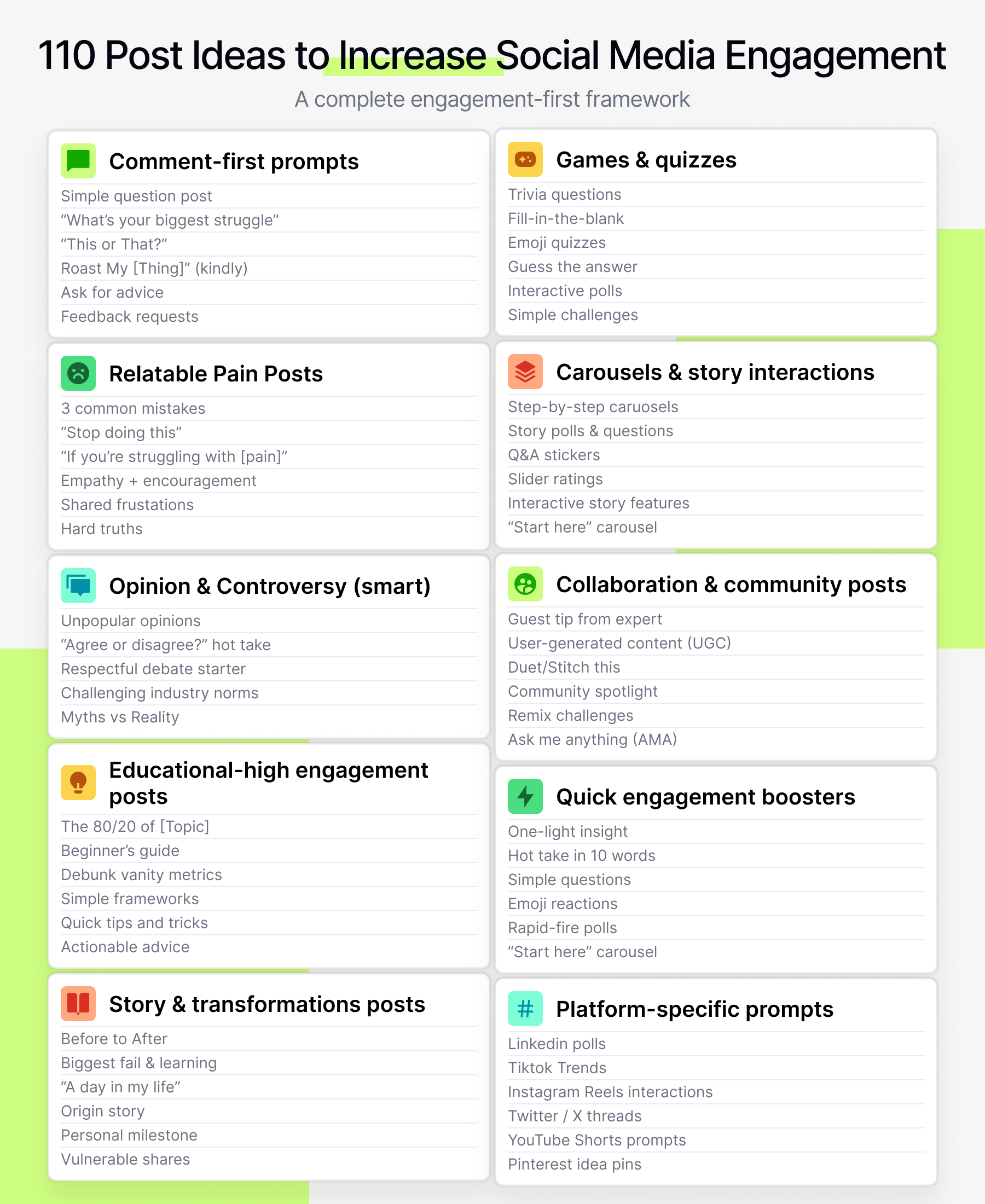
How These Ideas Are Designed to Boost Engagement
Every idea below is optimized for at least one of these:
- Comments & replies - to spark conversations
- Likes & reactions - quick, low-effort signals
- Saves & shares - deeper signals algorithms love
You can adapt these post ideas for:
- Platforms: Instagram, TikTok, LinkedIn, Facebook, YouTube, X
- Formats: Reels/Shorts, carousels, static posts, Stories, Lives
- Any niche: SaaS, ecom, creators, coaches, local businesses, etc.
From analyzing thousands of posts inside Socialmon, we've seen a consistent pattern: the posts that get the most engagement are almost never random. They:
- Ask a specific question or invite a small action
- Are visually simple to understand at a glance
- Use copy that talks like the audience, not at them
💡 Quick tip: If you don't know what "high engagement" looks like in your niche, open Socialmon and search your industry. Filter for the format you care about (Reels, carousels, LinkedIn posts, etc.), then scan by visible engagement. You'll see real examples of posts that actually drove comments, saves, and shares-not just ones that look pretty.
Let's get into the ideas.
A. Comment-First Prompts (Make It Easy to Respond)
These posts are engineered so your audience almost can't help but answer. They're simple, fun, and clearly ask for a response-perfect for getting more comments fast.
1. "One-Word Answer" Question
Ask for a reply that takes 2 seconds.
Examples:
- "Describe your week in one word."
- "In one word, how does [topic] make you feel right now?"
How to implement:
- Use text Stories, simple text posts, or overlays on Reels/Shorts.
- Keep the question ultra-clear and focused on a current moment or feeling.
- Reply to as many comments as you can to double the comment count and build relationships.
2. "This or That?" Post
Show two options and ask people to choose.
Examples:
- Designs, tools, outfits, product variations, strategies, hooks, thumbnails.
- CTA: "Comment A or B" or "Left or right?"
How to implement:
- Create a carousel or side-by-side graphic with clear labels (A/B or Left/Right).
- Ask a follow-up question like "Why?" to encourage longer replies.
- Turn it into a recurring series ("This or That Tuesday") so people anticipate it.
3. "Poll in the Comments"
Pose a question with 2-4 options and let people vote in the comments.
Example:
"What are you struggling with more:
A) [thing] or
B) [thing]?"
How to implement:
- Put the options in the image and repeat them in the caption.
- Ask people to type the full option ("I'm struggling more with...") to prompt longer comments.
- Summarize the results in a follow-up post for extra engagement.
4. "Agree or Disagree?" Hot Take
Share a short opinion and ask people if they agree.
Example:
"Hot take: [statement]. Agree or disagree?"
How to implement:
- Keep it about ideas, not individuals, to encourage healthy debate.
- Add one line of reasoning to show you're thoughtful, not just inflammatory.
- Reply to both sides and encourage nuance ("I see your point-what about X?").
5. "Predict the Result"
Describe an experiment and ask people to guess what happened.
Example:
"We tested [idea]. Do you think it:
A) Worked
B) Flopped
C) Did nothing?"
How to implement:
- Share just enough context to make guessing fun.
- Promise a follow-up post revealing the results.
- Tag or reply to people who guessed correctly to reward interaction.
💡 Socialmon tip: Search "question post", "poll", or "hot take" in your niche on Socialmon and save posts with lots of thoughtful comments to a "Prompts" board. You'll never run out of comment-first ideas again.
B. Relatable Pain & "Call Yourself Out" Posts
When people feel seen, they interact. These posts mirror your audience's inner monologue so they comment "this is me" or tag friends.
6. "Tell Me You're [Audience] Without Telling Me..."
Examples:
- "Tell me you're a developer without telling me you're a developer."
- "Tell me you're a founder without telling me you're a founder."
How to implement:
- Use a text post or talking-head video with the prompt on screen.
- Seed the first 2-3 funny examples in your caption to show the tone.
- Reply to the best ones and highlight them in Stories.
7. "Which One Are You?" Archetypes
Create 3-4 funny or accurate archetypes your audience relates to.
Example:
"The Overthinker, The Action Taker, The Perfectionist..."
How to implement:
- Make a carousel with one archetype per slide, plus a short description.
- CTA: "Comment which one you are (or tag a friend who is)."
- End with: "I'm definitely [type]-you?"
8. "You Might Be [Type of Person] If..."
List telltale signs.
Example:
"You might be a content marketer if..." + 5-7 bullet points.
How to implement:
- Mix pain points with inside jokes only your niche will get.
- Ask: "How many of these are you guilty of?" to spark replies.
- Encourage tags: "Send this to your [role] friend."
9. "Pain Scale" Check-In
Ask people to rate how much they struggle with something.
Example:
"On a scale of 1-10, how stressed are you about [topic] this week?"
How to implement:
- Use a simple graphic with the scale or a Story slider/emoji scale.
- Follow up in caption: "Comment your number and I'll reply with one suggestion."
- Group responses (e.g. "If you're 8-10, start with X.") for extra value.
10. "I Thought It Was Just Me, But..."
Share a common struggle or embarrassing behavior.
Example:
"I thought it was just me, but I always [relatable behavior]."
How to implement:
- Tell a short story (3-5 lines) and end with: "Anyone else?" or "Comment ME if you relate."
- Use it as a Reel/Short with the punchline as on-screen text.
- Save the best replies for future content ideas.
C. Opinion & Controversy (Handled Smartly)
You don't need drama. But a little tension around ideas can massively boost engagement when you keep it respectful.
11. "Overrated / Underrated" List
Label things in your niche as overrated or underrated.
Example:
"Overrated: [tool]. Underrated: [habit]."
How to implement:
- Share 3-7 items with quick justifications.
- CTA: "What would you change about this list?"
- Expect disagreement-reply with curiosity, not defensiveness.
12. "Unpopular Opinion"
Share a take that goes against mainstream advice (that you actually believe).
Example:
"Unpopular opinion: You don't need to post daily to grow-you need to post consistently good content."
How to implement:
- Start with "Unpopular opinion:" in text or hook.
- Add 2-3 lines explaining your reasoning.
- CTA: "Change my mind in the comments."
13. "Stop Doing This" Call-Out
Highlight a behavior people should stop, then offer a better alternative.
Example:
"Stop posting random updates. Start posting content designed for saves and shares."
How to implement:
- Use split-screen or carousel: "Stop → Start".
- Make the "start" option concrete (what to do instead).
- Ask: "Which one are you doing right now-be honest?"
14. "I Was Wrong About..."
Admit you changed your mind about something.
Examples:
- "I was wrong about hashtags."
- "I was wrong about cringe trends."
How to implement:
- Share the old belief, what changed, and your new approach.
- Ask: "Have you changed your mind about anything in [topic]?"
- This builds trust and sparks thoughtful replies.
15. "What Do You Think About [Trend]?"
Invite takes on a relevant trend.
Examples:
- New platform features
- Industry tools
- Viral formats or challenges
How to implement:
- Give 1-2 lines of context so people know what you're talking about.
- Ask: "Worth the hype or not?" or "Love it or hate it?"
- Time it near announcements/updates for maximum relevance.
💡 Socialmon tip: Save "unpopular opinion" and "trend reaction" posts from your niche in a Socialmon board. Use them to calibrate how bold you can be while still staying on brand.
D. Educational Posts With Built-In Engagement Hooks
These posts deliver real value and prompt people to respond-the perfect combo.
16. "3 Mistakes You're Probably Making With [Topic]"
Share 3 clear mistakes, then ask people which one they're guilty of.
How to implement:
- Keep each mistake short and specific.
- Add a "do this instead" line under each one.
- CTA: "Which one are you guilty of? Comment 1, 2, or 3."
17. "Choose Your Strategy" Comparison
Present two strategies and ask which your audience would pick.
Example:
"Would you rather:
A) Post daily but simple content
B) Post once a week but high production?"
How to implement:
- Use a side-by-side graphic or carousel with pros/cons.
- CTA: "Comment A or B and tell me why."
- Use responses to segment your audience preferences.
18. "Audit Yourself in the Comments"
Share a checklist and invite people to score themselves.
Example:
"How many of these 7 habits do you already have? Comment your number (1-7)."
How to implement:
- Turn a process into 5-10 simple bullets.
- Ask people to comment their score and one area they want to improve.
- Reply with 1 tailored suggestion to deepen the interaction.
19. "Swipe This and Report Back"
Give a tip/template and encourage people to try it.
How to implement:
- Share a concrete action (e.g. hook formula, CTA tweak, posting schedule).
- CTA: "Save this post. Try it in your next [format] and come back tomorrow to tell me how it did."
- Post a follow-up asking, "Did you try it? Comment your results."
20. "I'll Reply With a Custom Tip"
Offer personalized help in exchange for comments.
Example:
"Comment your [profile/website/niche], and I'll reply with 1 suggestion."
How to implement:
- Set a limit (e.g. "for the first 20 comments") if needed.
- Give concise but genuinely useful replies.
- Screenshot strong examples for future content (e.g. "Here's what I told 5 people about their bios...").
💡 Socialmon tip: Create a board of "Education + CTA" posts on Socialmon. When planning, skim it to see how other creators structure posts that both teach and ask for interaction.
E. Before/After, Results & Story Posts That Invite Conversation
Stories and transformations are naturally engaging-especially when they end with a question.
21. "Before vs After" Visual Post
Show a transformation relevant to your niche.
Examples:
- Design revamps
- Analytics before/after
- Physical transformation
- Process/workflow overhaul
How to implement:
- Put "Before" and "After" labels clearly on the visuals.
- CTA: "What's the first thing you notice?" or "Want a breakdown of how we did this?"
- Use a follow-up post to explain the transformation step-by-step.
22. "What Surprised Me Most About This Result"
Share an outcome and highlight the unexpected insight.
How to implement:
- Show the metric (e.g. engagement jump, revenue boost).
- Explain the surprising factor (e.g. short caption, boring thumbnail, posting time).
- Ask: "What surprises you most about this?" or "Which part would you like me to break down?"
23. "We Tried X for 30 Days"
Turn your experiments into bingeable content.
Example:
"We posted Reels daily for 30 days. Here's what happened."
How to implement:
- Summarize the experiment, the rules, and the results.
- Include 2-3 key takeaways.
- CTA: "Should we do this again or test something else next? Comment your ideas."
24. "What I'd Do Differently If I Started Again"
Reflect on a project with honesty.
How to implement:
- Pick one thing (account, product, campaign).
- Share 3-5 "If I started again, I would..." points.
- Ask: "What would you do differently in your last [launch/project]?"
25. "Help Us Decide: Which Version?"
Ask your audience to choose between options.
Examples:
- Landing pages
- Features
- Logos
- Product packaging
How to implement:
- Show 2-3 options clearly labelled.
- CTA: "Comment 1, 2, or 3-and tell us why."
- Use the feedback as lightweight user research and mention the winning choice in a later post.
F. Games, Quizzes & Fun Formats
Gamified posts boost engagement without needing deep educational content.
26. "Guess the Price / Result / Time"
Ask people to guess a number that isn't obvious.
Examples:
- "Guess how long this took."
- "Guess how much this saved us."
- "Guess how many attempts this took."
How to implement:
- Give just enough context to make guessing possible.
- CTA: "Closest guess gets a shoutout in tomorrow's post."
- Reveal the answer in a follow-up carousel or Reel.
27. "Two Truths and a Lie" (Niche Edition)
Share 3 statements related to your niche.
How to implement:
- Make 2 statements true and 1 false, all believable.
- CTA: "Which one is the lie-1, 2, or 3?"
- Reply later with the correct answer and short backstory.
28. "Bingo Card"
Create a bingo template of experiences your audience has had.
Examples:
- "New founder bingo"
- "Agency owner bingo"
- "Influencer bingo"
How to implement:
- Put 9-25 relatable items in a grid.
- CTA: "How many squares do you check off? Comment your number or screenshot and tag me."
- Repost fun examples in Stories.
29. "Would You Rather...?" (Niche Version)
Make "would you rather" questions specific to your topic.
Examples:
- "Would you rather have 10k engaged followers or 100k ghost followers?"
- "Would you rather never check analytics again or never check DMs again?"
How to implement:
- Use A/B format and keep both options a bit painful.
- Ask people to explain their choice for longer comments.
30. "Emoji-Only Replies"
Ask a question but limit answers to emojis.
Examples:
- "How's your launch going? Emoji-only answers."
- "What does your Monday feel like? Drop 3 emojis."
How to implement:
- Use this on days when people are tired of typing.
- React to interesting combinations or ask follow-up questions.
💡 Socialmon tip: Keep a Socialmon board just for "Engagement Formats" (bingo cards, quizzes, emoji posts). When you're planning a fun day, open that board and borrow a structure.
G. Engagement-First Stories & Carousels
Stories and carousels are perfect for micro-interactions: taps, swipes, replies, and quick votes.
31. "Rate This From 1-10"
Ask people to rate an idea, design, or concept.
Examples:
- A new thumbnail
- A landing page hero
- A Reel hook idea
How to implement:
- Use a simple screen: "Rate this [thing] from 1-10. Be honest."
- Encourage honesty: "No hard feelings-your feedback helps."
- Reply to people who give low numbers with "What would make it a 9-10 for you?"
32. "Choose Your Ending" Story or Carousel
Tell a story that branches and ask people what they'd do.
Structure:
- Slide 1-3: Setup the scenario
- Slide 4-5: Present 2-3 possible decisions
- CTA: "What would you do-Option A, B, or C?"
How to implement:
- Keep the scenario realistic for your audience (client problem, team conflict, feature tradeoff).
- Ask people to justify their choice in the comments.
- Post a follow-up revealing what you actually did and what happened.
33. "Ask Me Anything" in Stories
Use Stories as a lightweight AMA channel.
How to implement:
- Add a question sticker: "Ask me anything about [topic]."
- Answer a mix of beginner and advanced questions to include everyone.
- Save the best Q&As to a Highlight so new followers can binge and engage later.
34. "Poll Series" in Stories
Run 3-5 related polls in a row.
Example sequence:
- "Do you currently [do X]?" (Yes/No)
- "Do you wish you did?" (Yes/No)
- "What stops you?" (Multi-choice)
How to implement:
- Start broad, then go deeper with each poll.
- Share the results and key insights in a Story recap.
- Use responses to inspire future posts ("You told me your biggest blocker is X...").
35. "DM Me a Keyword"
Use Stories to drive private engagement.
How to implement:
- Offer a resource: checklist, script, template, Notion page.
- Story text: "DM me 'PLAN' and I'll send you my content calendar template."
- Optional: "Comment DONE once you've DMed me" on a feed post to stack comments + DMs.
💡 Socialmon tip: Save Story and carousel formats you love (poll series, rating posts, AMA structures) into a "Stories & Carousels" board on Socialmon. When planning your next week, open it and pick 2-3 formats to reuse with new topics.
H. Collaboration & Community Involvement
When people feel part of something, they naturally engage more.
36. "Feature Your Work" Post
Invite your audience to show how they use your advice, templates, or product.
How to implement:
- Prompt: "Use this template, then tag me or comment 'DONE' with your result."
- Collect entries for a few days.
- Share the best in a carousel or Story series and tag them.
37. "Create With Me"
Co-create something with your audience.
Examples:
- Naming a series
- Choosing a tagline
- Designing a product variation
How to implement:
- Share 2-3 options at each step ("Which headline feels stronger?").
- Ask people to vote and leave suggestions.
- Credit them when you reveal the final version.
38. "Introduce Yourself" Thread
Turn your comments into a mini community directory.
How to implement:
- Prompt: "Introduce yourself: Name, what you do, and your current goal."
- Pin the post or resurface it monthly for new followers.
- Encourage people to connect: "Reply to someone you'd like to meet."
39. "Your Turn to Teach"
Invite your audience to share their expertise.
Prompt examples:
- "What's your #1 tip for staying consistent with content?"
- "What's one thing you wish you'd known about [topic] earlier?"
How to implement:
- Ask for "1 tip per comment."
- Like and reply to strong tips.
- Turn the best ones into a "Community Tips" carousel and tag contributors.
40. "Community Wins"
Make celebrating wins a habit.
How to implement:
- Prompt: "What's one win from this week? Big or small."
- React to as many as possible (likes, replies, Story shoutouts).
- Use patterns you see (e.g. "many of you hit consistency streaks") as future content angles.
I. Quick, Low-Effort Engagement Boosters
Perfect for days when time or energy is low-but you still want engagement.
41. "Fill-in-the-Blank" Caption
Let people finish the sentence.
Examples:
- "The hardest part about [topic] is ______."
- "Content would be easier if ______."
How to implement:
- Use a text graphic or simple caption.
- Add: "No wrong answers." to lower the bar for commenting.
- Collect answers for future idea mining.
42. "Today's Mood"
Tie a mood check-in to your niche.
Examples:
- A meme about launch stress
- A GIF about Monday mornings
How to implement:
- Caption: "Comment your mood or pick 1-4: 😄 😐 😬 😭"
- Ask why for anyone who picks the extremes for deeper comments.
43. "Drop an Emoji If..."
Super low-friction, great for quick spikes.
Examples:
- "Drop a 🔥 if you're working on [goal] this week."
- "Drop a 💻 if you're creating content today."
How to implement:
- Keep the condition inclusive but not too generic.
- Follow up in Stories: "I see you 🔥 crew-here's one tip for staying on track this week."
44. "One Thing You're Grateful For Today"
Works especially well in communities, coaching, wellness, or creative niches.
How to implement:
- Prompt: "What's one thing you're grateful for today? Doesn't need to be big."
- Reply with simple encouragement or emojis.
- Use patterns (e.g. many grateful for time freedom) in future content.
45. "Reply With Your Favorite Tool / App / Resource"
Turn your comments into a recommendations thread.
Examples:
- "What's your favorite AI tool right now?"
- "Which app do you rely on the most at work?"
How to implement:
- Ask for one recommendation per comment.
- Add: "I'll share my favorites in a follow-up post."
- Use answers for "Top tools my audience loves" content.
💡 Socialmon tip: When tools or resources come up repeatedly, search for how others showcase them on Socialmon. Save those posts into a "Tools & Stack" board and use them as templates when you feature your own stack.
J. Strategic CTAs & Follow-Up Posts
Sometimes you don't need a new idea-just a smarter CTA or follow-up.
46. "Comment a Keyword for a Free Resource"
Classic engagement + lead-in to DMs or email.
How to implement:
- Share a teaser (e.g. 3 tips) and mention you have a full checklist/guide.
- CTA: "Comment CHECKLIST and I'll DM you the link."
- Deliver via DM or automated flow where allowed by platform rules.
47. "Which Topic Should I Cover Next?"
Let your audience shape your content queue.
How to implement:
- Offer 3-5 options directly tied to your expertise.
- CTA: "Comment 1-5 or suggest your own."
- Actually create content based on the winner and mention: "You voted for this."
48. "Reply If You Want to Join the Beta / Early Access"
Perfect for launches.
How to implement:
- Short post: "I'm opening early access to [thing]. Comment ME if you want in."
- Follow up by DM or email with more details.
- You get both engagement and a list of warm leads.
49. "Did This Help? Comment YES or NO"
End educational posts with a binary question.
How to implement:
- After a tutorial or breakdown, add: "Did this help? Comment YES or NO."
- If many say "NO" or "KIND OF," ask what they wish you'd covered-that's your next post.
50. "Here's What Happened After My Last Post"
Follow up on a popular or controversial post.
How to implement:
- Start with: "Remember when I said [X]? Here's what happened after..."
- Share results, lessons, or updated thoughts.
- CTA: "What do you think now?" or "Should we continue this experiment?"
K. Platform-Specific Engagement Prompts
Dial in posts for how people naturally behave on each platform.
51. "Comment Your Favorite [Tool / Resource / Account]"
Great for LinkedIn/X/Facebook.
Examples:
- "What's your favorite AI tool right now?"
- "Which account inspires you the most for [topic]?"
How to implement:
- Ask for 1 answer + 1 reason ("Why that one?").
- Like and reply to strong answers.
- Collect names for a "community-curated recommendations" post later.
52. "Remix This Reel / TikTok"
Invite remixes/stitches with your template.
Examples:
- "My daily routine as a [role]. Remix with yours."
- "What I thought [role] would be vs what it actually is."
How to implement:
- Use simple, copy-able formats and on-screen instructions.
- Caption: "Remix this with your version and tag me so I can see it."
- Comment on and share the best remixes.
53. "Reply With a GIF That Describes Your Week"
Perfect for X, LinkedIn, Facebook.
How to implement:
- Prompt: "Reply with a GIF that sums up your week in one move."
- Respond to funny or relatable GIFs.
- This can explode replies because GIF responses are low-effort and fun.
54. "Drop a Link to Your Latest Post"
Host a controlled "self-promo" thread.
How to implement:
- Prompt: "Drop a link to your latest post below. Support each other with a like or comment."
- Pin the post if community-ish.
- Occasionally do "review rounds" where you pick 1-2 posts and give feedback.
55. "Reply With One Word: Yes or No?"
Binary questions that are still niche-relevant.
Examples:
- "Should [trend] die in 2025? Yes or no?"
- "Is [tool] still worth using? Yes or no?"
How to implement:
- Use when the topic is already buzzing.
- Ask for reasons in a follow-up: "Why did you say yes/no?"
💡 Socialmon tip: In Socialmon, search per platform (e.g. "LinkedIn carousel poll", "TikTok stitch challenge") and save high-engagement examples into platform-specific boards, so your prompts match how people actually use each app.
L. Live Sessions & Q&A Engagement Ideas
Live formats concentrate engagement into a short window.
56. "Ask Me Anything" Live
Run AMAs on a focused topic.
How to implement:
- Announce the live with a feed post: "Ask me anything about [topic]-drop your questions below."
- Answer some questions from comments + live chat.
- Save the live and pull 3-5 best clips for future Reels/Shorts.
57. "Live Audit" Session
Review follower content live.
Examples:
- Profile audits
- Homepage audits
- Content audits
How to implement:
- Post: "Comment AUDIT if you want your [profile/asset] reviewed on the next live."
- Choose a handful and let them know when you'll go live.
- Keep feedback constructive; invite chat to weigh in.
58. "Office Hours"
Recurring weekly live slot.
How to implement:
- Pick a consistent day/time.
- Post: "Every [day] at [time], I go live for 30 minutes to answer your questions."
- Ask people to comment questions in advance for priority and pre-live engagement.
59. "Build in Public" Live
Work on something real with your audience.
How to implement:
- Choose a task you can do while talking (writing hooks, planning content, designing a simple page).
- Ask chat for votes: "Hook A or B?", "Green or purple?"
- Summarize key decisions in a recap Reel or post.
60. "Post-Live Recap"
Extend live engagement back to your feed.
How to implement:
- After each live, share a carousel: "5 best questions from yesterday's live."
- Tag people (if usernames are visible and it's appropriate).
- CTA: "Comment if you want in on the next live."
M. User-Generated Content & Social Proof Posts
These ideas create engagement while generating reusable content and proof.
61. "Show Us How You Use [Product / Tip]"
Turn usage into a mini-campaign.
How to implement:
- Prompt: "Use this tip and share your result-tag me or use #[yourhashtag]."
- Feature 3-10 examples in a follow-up carousel.
- Ask: "Which one is your favorite-1, 2, or 3?"
62. "Reaction Round-Up"
Crowdsource reactions to a feature, update, or announcement.
How to implement:
- Post: "What's your honest reaction to [update]? Excited, skeptical, or confused?"
- Later, create a summary post of top reactions (with permission), grouped by theme.
- CTA: "Do you agree with these?"
63. "Share Your Best Result Using Our Advice"
Invite testimonials in comment form.
Prompt:
"If any tip from this account has helped you, drop your result below 👇"
How to implement:
- Ask for specifics: "What did you implement and what changed?"
- Reply with thanks + follow-up questions.
- Save these as screenshots for future social proof posts.
64. "Duet / Stitch Our Tutorial With Your Outcome"
Turn tutorials into content chains.
How to implement:
- Share something simple to replicate.
- CTA: "Duet/stitch this with your attempt and tag me so I can comment."
- Publicly comment on and reshare your favorite attempts.
65. "Feature Friday"
Weekly follower/customer spotlight.
How to implement:
- Each Friday, feature one person's story or content.
- At the end of the caption, ask: "Want to be featured next? Comment what you're working on."
- This builds anticipation and recurring engagement.
N. Trend & Timing-Based Engagement Ideas
Ride existing attention waves instead of starting from zero.
66. "React to a Trending Topic"
Bring your angle to a news or industry trend.
How to implement:
- Summarize the trend in 1-3 lines (assume not everyone knows).
- Share your take: what it means, what people should watch out for.
- Ask: "What do you think this means for [audience]?"
67. "Year-in-Review" Thread
Use year-end reflection for engagement.
Prompts:
- "What's one win you're proud of from this year?"
- "What's one thing you survived that you didn't expect to?"
How to implement:
- Encourage big and small wins.
- Reply with celebration or gentle probing ("How did you make that happen?").
68. "Quarter Check-In"
Good for planning and accountability.
Prompts:
- "What's one thing you want to achieve in the next 90 days?"
- "What's one thing you're leaving behind next quarter?"
How to implement:
- Time posts at quarter start/end.
- Resurface them with a follow-up: "How did Q2 go compared to what you wrote here?"
69. "Holiday-Themed Question"
Tie your niche to major holidays or seasons.
Examples:
- "Best and worst Black Friday purchase you've ever made?"
- "What are you leaving behind this New Year?"
How to implement:
- Keep it aligned with your brand (e.g. money, mindset, productivity, creativity).
- Ask for stories, not just one-word answers.
70. "Trend Rating" Post
Rate current trends and invite ratings.
How to implement:
- List 5 trends in your niche.
- CTA: "Rate each 1-10 or comment KEEP/KILL next to each one."
- Use results in a follow-up post, e.g. "Top 3 trends you want to keep in 2025."
💡 Socialmon tip: Trends move fast. Use Socialmon to save trend-based posts from your niche so you can see how brands participated without being cringey-and borrow their framing later.
O. DM & Comment Workflow Engagement Ideas
Designed to spark both public comments and private conversations.
71. "Comment a Keyword and I'll DM You a Resource"
Engagement + lead capture.
How to implement:
- Tease the resource: "I turned this into a full checklist."
- CTA: "Comment CHECKLIST and I'll DM it to you."
- Use saved replies/short templates to handle volume while staying personal.
72. "Comment for a Personalized Suggestion"
Offer 1 quick insight per comment.
Prompt examples:
- "Comment your niche and I'll give you 1 content idea you can post this week."
- "Comment your homepage URL and I'll give you 1 thing to fix."
How to implement:
- Do this occasionally (high effort).
- Answer with 2-3 lines max to stay sustainable.
73. "Comment for a Scorecard"
Use a self-assessment framework.
How to implement:
- Mention your scorecard: "I made a quick scorecard so you can grade your [thing]."
- CTA: "Comment SCORE and I'll send it to you."
- Deliver via DM or link reply.
74. "DM Me 'X' If You Want Early Access"
Create a simple code word system.
How to implement:
- Feed post: "DM me 'BETA' if you want early access to [thing]. Comment DONE once you've DMed me."
- Track interest, prioritize replies based on comment timestamps.
75. "Screenshot This and Share in Your Story"
Turn your post into shareable content.
How to implement:
- Create a quote, reminder, or checklist that looks good as a Story.
- CTA: "Screenshot this, share to your Stories, and tag me. I'll repost a few."
- Reply with thanks to people who tag you to keep the loop warm.
P. Multi-Part & Cliffhanger Content
Use curiosity and "Part 2" dynamics to pull people deeper.
76. "Part 1 of 3" Series
Break a topic into multiple posts.
How to implement:
- Start with: "Part 1 of 3: [topic]. Comment PART 2 if you want the rest."
- Only publish Part 2/3 if response is decent-this keeps you audience-led.
- Use a consistent thumbnail/cover style so people recognise the series.
77. "I'll Share the Results Tomorrow"
Create a mini cliffhanger.
How to implement:
- Post about the setup of an experiment today.
- Ask: "What do you think will happen?" and encourage predictions.
- Share the outcome tomorrow and tag or reply to commenters who predicted correctly.
78. "Can You Guess What Happened Next?"
Story-based cliffhanger.
How to implement:
- Tell half the story up to the turning point.
- CTA: "What do you think happened next?"
- In the follow-up post, reveal and break down the lesson.
79. "3 Secrets, One Per Day"
Turn big topics into tiny daily posts.
How to implement:
- Post: "3 secrets to [outcome]-I'll share one per day this week."
- Ask: "Which one are you most excited to hear about-1, 2, or 3?"
- Adjust order based on responses.
80. "You Choose What Happens in Part 2"
Let the audience direct the next chapter.
How to implement:
- End Part 1 with 2-3 possible paths.
- CTA: "Vote A/B/C in the comments for how you want this to continue."
- In Part 2, clearly say: "You voted for B-here's what we did."
Q. Interactive Educational Content
Make learning hands-on instead of passive.
81. "Self-Assessment Quiz"
Mini-quiz inside a post or carousel.
How to implement:
- 3-5 questions, each with A/B/C style answers.
- Scoring guide: "Mostly A? You're here. Mostly B? You're here."
- CTA: "Comment your score and I'll reply with 1 suggestion."
82. "Rate This Idea"
Test ideas in public.
How to implement:
- Share a content idea, offer, or feature concept.
- CTA: "Rate this idea from 1-10. Would you actually use it?"
- Use responses to refine before building.
83. "Choose a Mini-Scenario"
Segment your audience based on their situation.
How to implement:
- Describe 3 scenarios: A, B, C.
- CTA: "Which one are you-A, B, or C?"
- Reply to each scenario comment with one tip tailored to that situation.
84. "Try This and Report Back"
Turn your audience into testers.
How to implement:
- Share a simple experiment (posting time, hook formula, CTA style).
- CTA: "Try this in your next post and come back tomorrow to share the results."
- Post a recap of the best results, tagging commenters (if appropriate).
85. "What Would You Do?" Case Study
Ask for decisions on real cases.
How to implement:
- Describe a client/user situation (anonymized).
- CTA: "What would you do in this situation?"
- In a follow-up, share what you actually did and why-and tag some commenters with interesting ideas.
💡 Socialmon tip: Save high-engagement case study posts into a "Case Studies & Interactive" board on Socialmon. Use them as templates when you want content that teaches and invites discussion.
R. Feedback & Research Posts (Engagement + Insight)
These posts give you data while driving replies.
86. "What Content Do You Want More Of?"
Let your audience vote on future content.
How to implement:
- Offer 3-5 content types: "Tutorials, behind-the-scenes, audits, mindset, Q&As."
- CTA: "Comment your top 2."
- Use results to plan upcoming weeks.
87. "What's Missing in [Industry/Niche] Right Now?"
Invite constructive rants.
How to implement:
- Prompt: "What frustrates you most about [tool/industry] right now?"
- Ask for specifics: "What have you tried? What didn't work?"
- Save answers for offer, feature, or content ideas.
88. "Have You Tried [X] Before?"
Crowdsource reviews.
How to implement:
- Ask yes/no plus "What was your honest experience?"
- Use answers to create pro/con, "who it's for" style posts later.
89. "What's Your Biggest Blocker Right Now?"
Classic but powerful.
How to implement:
- Keep it focused-"Biggest blocker with sales?" / "With content?" / "With hiring?"
- Group common blockers and create 1 post per blocker over the next weeks.
- Mention: "You told me your biggest blocker was X-here's a way to approach it."
90. "If You Could Fix One Thing Instantly..."
Magic wand question.
How to implement:
- Prompt: "If you could wave a magic wand and fix one thing in [topic], what would it be?"
- Read for emotion: words like "overwhelmed", "confused", "burnt out" show high pain.
- Reply with empathy + 1 tiny step they can take.
S. Meta Engagement Posts (Talking About Engagement Itself)
Content about content attracts creators, marketers, and founders-often your best engagers.
91. "What's Your Average Engagement Rate?"
Open a nerdy but useful conversation.
How to implement:
- Ask: "Do you know your average engagement rate? If yes, what is it? If no, comment NO and I'll share a simple way to calculate it."
- Follow up with a post explaining how to calculate engagement rate.
92. "What 'Engagement Hacks' Have Actually Worked for You?"
Gather real experiences.
How to implement:
- Prompt: "What's one thing that actually helped you get more engagement-and one that completely flopped?"
- Summarize answers in a later carousel: "Hacks that actually worked for my audience."
93. "What Would Make You Comment More on Posts Like This?"
Ask directly how to improve.
How to implement:
- Options: "Shorter posts, more examples, more templates, more visuals?"
- Encourage honesty; don't be defensive.
- Adjust future content and tell them: "You said you wanted more [X], so here it is."
94. "Introverts vs Extroverts Online"
Fun meta self-typing.
Prompt:
"Are you a lurker (likes only), commenter (I talk a lot), or poster (I create most of the time)?"
How to implement:
- Ask people to comment their type.
- Reflect back: "Lots of lurkers here-this is your sign to comment more 😉."
95. "Tell Me Why You Followed Me"
Goldmine question for content direction.
How to implement:
- Prompt: "Was it a specific post, a topic, or a vibe? Tell me below."
- Use answers to double down on the hooks, topics, and formats that actually attracted people.
T. Ultra-Simple Prompts for Busy Days
These are the "no excuse" posts-fast to create, easy to respond to.
96. "Current Status in 3 Emojis"
Prompt:
"Your day so far in 3 emojis-go."
How to implement:
- Post as text or simple graphic.
- Reply with one emoji or short comment to keep threads active.
97. "Morning Check-In / Night Check-Out"
Build simple rituals.
Prompts:
- Morning: "What's one thing you're focusing on today?"
- Night: "What's one win from today?"
How to implement:
- Use consistently on certain days ("Monday check-in", "Friday wins").
- Encourage small wins to keep it accessible.
98. "Confession Time"
Safe, light confessions.
Prompt examples:
- "What's one 'bad habit' you have in [topic] that you know you should fix?"
- "Confession: I still [habit] even though I know better. Your turn."
How to implement:
- Start with your own confession to set the tone.
- React to confessions with humor and empathy.
99. "Finish This Sentence"
Examples:
- "Content would be easier if ______."
- "My biggest challenge with [topic] is ______."
How to implement:
- Use a simple brand-colored text background.
- Keep the sentence short so it's easy to complete.
100. "If You Could Ask Me One Question..."
Huge source of ideas.
How to implement:
- Prompt: "If you could ask me one question about [topic], what would it be?"
- Save the questions into a doc or Socialmon board for future content.
- Answer some in the comments and others in future posts.
101. "Drop a 🧠 / 👀 / ✅ If You Want a Full Breakdown"
Emoji vote as CTA at the end of a post.
How to implement:
- After a teaser or short insight, add: "Drop a 🧠 if you want a full breakdown."
- If engagement is good, create the breakdown and mention: "You dropped the 🧠 so here it is."
102. "Vote With a Reaction Only"
Use built-in reactions.
Examples:
- "Use 👍 if you agree, 💡 if this gave you an idea, ❤️ if you want more posts like this."
How to implement:
- Works best on LinkedIn/Facebook where reaction variety exists.
- Analyse which reaction got the most clicks to guide future content.
103. "Tell Me Where You're From"
Simple, evergreen community prompt.
How to implement:
- Prompt: "Comment your city + country 👇"
- Group replies in a follow-up: "We've got people from X countries here."
104. "What Did You Think of This Post, Honestly?"
Ask for direct feedback.
How to implement:
- Use when you try a new format or length.
- Prompt: "Too long, too short, or just right? Tell me in the comments."
- Use responses to shape future experiments.
105. "What Should We Name This Series?"
Let the audience brand your content series.
How to implement:
- Describe the series in 1-2 lines.
- CTA: "Drop your name ideas below."
- Credit the person whose name you pick.
106. "Screenshots or It Didn't Happen"
Invite people to share proof of something relevant.
Examples:
- Their messy desktop
- Their screen time
- Their content calendar
How to implement:
- Prompt: "Describe or screenshot your [thing] and share it in the comments/Stories."
- React with fun, non-judgmental replies.
107. "If You Could Collaborate With Anyone, Who Would It Be?"
Aspirational + tag-friendly.
How to implement:
- Prompt: "If you could collaborate with anyone in this space, who would it be and why?"
- People tag others; sometimes those people join the thread.
- Great way to see which names your audience admires.
108. "What's the Most Overrated Advice in [Niche]?"
Let people vent (respectfully).
How to implement:
- Prompt: "What's the most overrated advice you see in [niche]?"
- Encourage constructive criticism, not personal attacks.
- Turn recurring themes into an "advice to be careful with" post.
109. "What Do You Wish More People Knew About [Topic]?"
Open-ended but powerful.
How to implement:
- Prompt: "What's one thing you wish more people understood about [topic]?"
- These answers are excellent raw material for future posts and hooks.
110. "What Post Should I Repost From My Archive?"
Let your audience pick your reruns.
How to implement:
- Prompt: "If you've been here a while, what topic should I bring back or update?"
- Then repost/refresh your old content and tag a few people who asked for it.
How to Turn These Ideas Into an Ongoing Engagement Engine
You don't need to use all 110 ideas at once. To increase engagement sustainably:
1. Pick 5-10 Ideas to Test Over the Next 2 Weeks
Choose a mix of:
- Comment-first prompts (A, B)
- Opinion/controversy formats (C)
- Educational posts with strong CTAs (D, Q)
- Fun/game formats (F, T)
Set a simple experiment goal: "For 2 weeks, everything we publish must explicitly invite a response."
2. Measure More Than Likes
Don't just chase hearts. Track:
- Comments & replies per post
- Saves & shares
- Profile visits from posts
- DMs and Story replies
Log these weekly so you can see which ideas truly boost engagement, not just impressions.
3. Double Down on What Works
When a post format works:
- Turn it into a recurring series (e.g. "This or That Tuesday", "Friday Wins").
- Keep the skeleton (structure, CTA) and swap in new topics each week.
- Build 2-3 "engagement anchors" your audience can recognize and look forward to.
4. Train Your Audience to Expect Interaction
If most of your posts are passive, people behave passively.
- Ask for a specific action in almost every post.
- Reply to comments quickly, especially early on.
- Occasionally reward engagement (features, shoutouts, free audits).
Over time, your audience learns: "This isn't a billboard account, it's a conversation account."
5. Build Your Own Private "Engagement Swipe File"
You'll make this 10x easier if you stop relying on memory.
With Socialmon, you can:
- Save your own top-performing engagement posts into a dedicated board.
- Add high-engagement posts from other brands and creators in your niche.
- Tag each post by format ("question", "poll", "DM CTA", "series opener") and goal ("comments", "shares", "DMs").
Then, when you plan content:
- Open your "Engagement Swipe File" board in Socialmon.
- Filter by format or goal (e.g. "DM CTAs" or "polls").
- Pick 3-5 post structures and adapt them to your brand and audience.
Planning a week of high-engagement content becomes a 10-minute job, not a blank-page nightmare.
FAQ: Getting More Engagement on Social Media
1. What type of posts get the most engagement on social media?
Posts that invite a specific, low-friction response tend to perform best:
- Direct questions and "this or that" prompts
- Polls and rating posts
- Hot takes and "agree/disagree" opinions
- Relatable pain/confession posts
- Educational posts with clear CTAs ("Comment X for Y", "Save this to try later")
Use this guide to mix:
- Comment-first prompts (Sections A, B, I)
- Opinion content (Section C)
- Interactive education (Sections D, Q)
- Stories and results (Sections E, P)
And when you're stuck, search your niche in Socialmon and sort by visible engagement to see what's actually working in the wild.
2. How often should I post if I want more engagement?
You don't need to post daily.
A good starting point for most brands:
- 3-5 strong, engagement-focused posts per week on your main platform.
Focus on:
- Consistency: can you keep this up for 3-6 months?
- Intent: does every post clearly invite a reply, reaction, save, share, or DM?
Daily low-effort posts usually underperform compared to fewer, intentional engagement-first posts.
3. What if I have a small following-will these post ideas still work?
Yes. In many cases, small accounts have higher engagement rates because their audience feels more personal.
If you're small:
- Start with simple prompts: Sections A, B, I, and T.
- Reply to every comment-your responsiveness is your superpower.
- Use DMs for deeper conversations (sections O & J formats).
You're training a small core of people to interact deeply. That core becomes your first wave of "super-engagers" as you grow.
4. What is a "good" engagement rate?
It varies by platform and niche, but as a rough ballpark for many accounts:
- 1-3% = normal
- 3-6% = strong
- 6%+ = very strong
Instead of obsessing over a universal number:
- Calculate your own baseline (using likes + comments + saves, divided by reach or followers).
- Track it monthly.
- Aim to improve it by focusing on higher-intent actions (comments, saves, shares, DMs).
5. Does asking for comments, saves, or shares hurt reach?
Not if it's done naturally and paired with real value.
Algorithms reward meaningful engagement, not silence. Asking:
- "Comment YES if this helped."
- "Save this so you can use it later."
- "Share this with someone who needs to hear it."
...is totally fine when the post delivers.
Just avoid spammy, disconnected CTAs ("comment for no reason") that feel manipulative rather than helpful.
6. How can I find more examples of high-engagement posts in my niche?
Instead of guessing, build a habit of collecting what already works.
Inside Socialmon, you can:
- Search by niche, platform, or format (Reels, LinkedIn carousels, TikToks, etc.).
- Save posts with lots of comments, saves, or creative CTAs into boards like:
- "Question posts"
- "Polls & ratings"
- "DM workflows"
- "Series openers"
- "Question posts"
- Tag each post by goal ("comments", "shares", "DMs", "community").
Then, when you plan your next sprint:
- Open your engagement boards in Socialmon
- Pick 5-10 proven structures
- Swap in your niche, your examples, and your voice
That's how you turn "no one is engaging with my posts" into "I can't keep up with the comments."



Get 50 viral posts for your niche (free)